
Search the Community
Showing results for tags 'update'.
-
Hello, Sir, We need to Update Product Prices like this, as we didn't see confirmation of it. But we just need currency updates, please help me. Thank you for your time to support me. 🙏🏽

-
 Update 8.13.0 to 8.13.1 error. after update i get this message "Update Failed: Files and database are already up to date". then WHMCS say delete the install folder after delete everything is ok. WHMCS is up to date. But what is "Update Failed: Files and database are already up to date" ?
 -
 1. Password Manager For WHMCS 3.4.0 - 25% OFF! Security and sensitive data? While these two go hand in hand by default, we continue to take extra steps to strengthen this crucial bond. After all, when it comes to safety, there’s no place for average solutions. That’s why we stick to the best ones, and the latest release of version 3.4.0 of our trusted Password Manager For WHMCS proves that the module is in top shape. What exactly are its newest superpowers? Let’s introduce them: Full compatibility with WHMCS V8.12Encryption Keys to enhance defense against potential intrusionsCustom tags, transforming the way access details are organized and managedLogs that shed more light on the activities surrounding stored credentials See? We know that in the pursuit of security, there’s no such thing as slowing down. How about reinforcing your own toolkit and keeping up? Given that the module is now available at a 25% discount, this is the perfect time to start! Explore all the capabilities of Password Manager For WHMCS 3.4.0! 2. Freshdesk For WHMCS 1.5.0 There’s another thing we don’t leave room for at ModulesGarden: complexity. As firm believers that the best workflows are always the streamlined ones, we’ve enriched our Freshdesk For WHMCS with two features designed for maximum convenience. Wondering what version 1.5.0 brings to the table? Let’s take Freshdesk Ticket Forms support, which allows you to choose the right form for each ticket, ensuring clients provide all the necessary details upfront. And with Single Sign-On (SSO), you don’t need to dig through sets of passwords - just log in instantly to the Freshdesk account. This is what we call providing shortcuts without cutting corners! Find out more about our Freshdesk For WHMCS 1.5.0! Need WHMCS Module Development For Your Business? Get Your Free Quote Now! We can customize our modules to fit your exact needs or even create a completely new one from scratch to give your WHMCS platform an added boost!
 -
1. Server Monitoring For WHMCS 1.1.0 - 20% OFF! When it comes to our WHMCS modules, we always have a clear vision of each and every one of them, and we know exactly how to bring our concepts into reality. From day one, the youngest in the family has proven to be a true professional in server supervision. What we're referring to is our Server Monitoring For WHMCS, recently updated for the first time since its official launch. Version 1.1.0 boasts an array of special features, including: Integration with SMS Center For WHMCS, enabling an extra channel for client notifications about potential issues A new "Port Connect" check type to confirm server accessibility through a specific port The "Notification Delay" feature to adjust the frequency of alerts sent to clients Expanded configurable options that grant customers more flexibility in defining how their servers are monitored A dynamic graphical display in the client area, visualizing service check status over time It’s already a pro, but the module keeps gaining new skills. How about taking advantage of it now while it's cheaper by 20%? Learn all about our Server Monitoring For WHMCS 1.1.0! 2. WHMCS V8.12 Support - Modules List Alongside our weekly release highlights, we continue running compatibility tests. And we're serious about the score, which is why the number of WHMCS V8.12-ready modules is growing spectacularly. The question is: are you up to speed? Follow the list of modules that support WHMCS V8.12! 3. Looking for business insights beyond ModulesGarden Sticking to business as usual is fine, but if you want to reach for opportunities outside your current scope, let us show you what's worth diving into: EasyDCIM v.1.15.0 and its powerful new protections, such as the System Security section with in-depth insights into your system’s integrity, and ModSecurity support tightening defense against cyber attacks MetricsCube’s take on why it matters for your business to recognize regular customers and connect with them PanelAlpha v1.1.7, offering significantly more convenient pre-migration website testing thanks to integration with WithoutDNS As you can see, there’s plenty to explore and benefit from, no matter which path you want to take next! Need WHMCS Module Development For Your Business? Get Your Free Quote Now! We can customize our modules to fit your exact needs or even create a completely new one from scratch to give your WHMCS platform an added boost!
-
1. DNS Manager For WHMCS 3.6.0 - 20% OFF! The stream of updates has been flowing rapidly, and another one of our WHMCS modules has just been swept along with the current, exactly 13 years after its first stable release. We’re talking about our renowned DNS Manager For WHMCS and its latest 3.6.0 edition. Curious what we’ve added to the package of functionalities to make the module even more capable of assisting you in your daily operations? Here's a glimpse: Support for WHMCS V8.12Deleted Zones tool that lets you recover deleted DNS and rDNS zones, along with their associated DNS and PTR recordsThe ability to create custom PTR records in the admin area for unassigned rDNS zonesThe availability of three new API methods, making DNS record management smoother So, with these new features and a 20% discount within reach, do you want to experience firsthand how the product can benefit your business? Learn more about DNS Manager For WHMCS 3.6.0! 2. EasyDCIM v1.15.0 is out! There are many factors that determine the direction of a business’s development, but if security isn’t one of the key principles, any threat along the way could easily become the end of the road. EasyDCIM understands this, and equips you with the tools to stay on the right path, ensuring you keep moving forward, no matter the obstacles. With the release of version 1.15.0, the platform’s ability to protect your system from dangers has significantly increased. The key updates in the field involve: The new System Security section, featuring configuration checks and recommendations for improving system protectionAdded ModSecurity support, enhancing the defense of Debian-based systems against unauthorized access attemptsThe new template in the OS Installation extension, enabling the automatic installation of Fedora Server 41 Seems like it’s time to start your data center adventure, with the complete equipment to stay threat-proof! Explore all the new features of EasyDCIM v1.15.0! 3. Know your subscribers better with MetricsCube Data never lies, and MetricsCube ensures you fully grasp each message. This time, the bottom line is: clients who pay regularly are one of the pillars of your success, so be sure you take care of them properly. The platform is here to help. With in-depth reports on your subscriber base, you can effortlessly track customer engagement and transform all those valuable insights into strategic actions - whether focused on communication, marketing, or beyond. What do the numbers reveal, and how can you connect the dots to boost your recurring revenue? We’re happy to guide you to where everything is laid out clearly. Build stronger bonds with your subscribers and watch your income grow! 4. WHMCS V8.12 Support - Modules List Our list keeps expanding and new names are making their way in all the time. Just in case you haven’t been up to speed lately, we’re referring to a complete rundown of our WHMCS modules that are fully compatible with WHMCS V8.12. Check if your favorites are already WHMCS V8.12-friendly! Need WHMCS Module Development For Your Business? Get Your Free Quote Now! We can customize our modules to fit your exact needs or even create a completely new one from scratch to give your WHMCS platform an added boost!
-
1. Black Weeks still in action - with 20% OFF! Halfway through our Black Weeks sale, let us speed things up a bit and welcome Cyber Monday with open arms! If you haven’t grabbed any of our WHMCS modules yet, this is your chance to make it happen with a 20% OFF across our product-rich store. Would you like to buy an Annual License, or are you more inclined to go for the Open Source option? Or maybe a License Upgrade is what you’re considering? No matter the choice, rest assured the discount applies. The only condition is that you need to take action before the end of December 8th, as that's the day our promo code BlackWeeks20% stops working. Feel the magic of Black Weeks! 2. OpenStack Projects For WHMCS 1.9.0 - 25% OFF! We might be deep into the Black Week excitement, but there’s no such thing as missing out on a major upgrade of the week. So, big news for those who are interested in OpenStack Projects For WHMCS: the latest 1.9.0 version has landed, packed with fresh updates designed to make managing your projects smoother and more efficient. Here’s how: A new widget in both the admin and client area allows for tracking "Block Storage Limits", so storage usage can be monitored at a glance.Enhanced "Queue" section offers deeper insight into cron job performance.Improved project termination ensures that the assigned routers, networks, VPN services, and K8s clusters are also automatically removed. And the list goes on in the changelog! If you’re already intrigued, you can give the module a go for nearly 25% OFF for as long as our Black Weeks' discount works in tandem with our Deal Of The Week! Learn more about OpenStack Projects For WHMCS 1.9.0! 3. MetricsCube boosts financial reporting Do you know what the specialty of MetricsCube is? Turning data into actionable insights! The recent update confirms that. The platform has been equipped with the "Revenue By State" report that helps you keep tabs on your business performance across regions. What’s more, to uncover even more precise insights, you can use the newly added shortcut to jump from financial reports straight to the Segmentation section. There’s more waiting to be explored! Especially now that you can take advantage of the promo code BlackWeeks20% to unlock a 20% discount covering 3 months on the platform! Discover the updated MetricsCube! 4. PanelAlpha rolls out version 1.1.6! PanelAlpha is raising the bar yet again with its latest update - version 1.1.6 - delivering tools to make your WordPress hosting experience smoother than ever: Diagnostic Mode that keeps you well-informed whenever a hosting issue begins to affect a WordPress instance, helping you quickly address problems.The option to run custom WP-CLI commands to ensure that every new instance is perfectly configured with minimal effort. Why not take a look at the full package of updates? With the special code BlackWeeks20%, you can save 20% while exploring the platform’s potential for 3 months! Get to know PanelAlpha v1.1.6 better! Need WHMCS Module Development For Your Business? Get Your Free Quote Now! We can customize our modules to fit your exact needs or even create a completely new one from scratch to give your WHMCS platform an added boost!
-
1. Lagom One Step Order Form For WHMCS 1.2.6 - 10% OFF! Realizing that our Lagom One Step Order Form For WHMCS catches the eyes of many, we’re cutting to the chase: version 1.2.6 is out, and the features it brings are sure to amaze you. Let us first mention that the time has come for the module to join the member-rich team of products that boast full support for WHMCS V8.11 and PHP 8.2. What's more, we've managed to enhance your clients' ordering experience by introducing a brand-new "View Cart" page mode, which leverages WHMCS logic to ensure smooth and hassle-free redirection for all major payment gateways, including PayPal and Stripe. Why not see how it all works in practice? Grab your chance while Lagom One Step Order Form For WHMCS is available for purchase at a 10% discount! Learn all about Lagom One Step Order Form For WHMCS 1.2.6! 2. IP Manager For WHMCS 3.1.0 - 20% OFF! If you’re looking for a reliable solution designed specifically to streamline the management of IP addresses within your WHMCS environment, rest assured - we got you covered. Our IP Manager For WHMCS is what fits into your toolkit perfectly, and now, just after the release of version 3.1.0, it’s in a better shape than ever. As always, we’ve been aiming to boost your workflows and ensure the best ordering experience for your customers. This is why the latest edition features the "Access Control" tool thanks to which you can easily set permissions and determine which module functionalities remain accessible to your staff. We’ve also made some improvements to other key aspects of the module, the result of which is that you get a clearer view of how your system is performing and enjoy smoother migration of complex subnets. We can sense you are ready to take a purchasing step, so let us just offer some further encouragement: the module is now cheaper by 20% as part of our Deal Of The Week! See the changelog of our IP Manager For WHMCS 3.1.0! 3. PanelAlpha rolls out version 1.1.5! You might not have heard it yet, so we feel almost obliged to bring you up to speed on the release of version 1.1.5 of PanelAlpha. This only proves once again that the platform is all about delivering what’s best for its customers. What to expect? First of all, now you are provided with several domain DNS verification choices available directly within the PanelAlpha interface so that you can easily check whether the domain is correctly configured. The latest version also concentrates on utilizing the updated capabilities of PanelAlpha WordPress Hosting For WHMCS that enables automatic synchronization of customer accounts from PanelAlpha to WHMCS. Discover the full potential of PanelAlpha v1.1.5! Need WHMCS Module Development For Your Business? Get Your Free Quote Now! We can customize our modules to fit your exact needs or even create a completely new one from scratch to give your WHMCS platform an added boost!
-
I am wanting to switch from one credit card processing gateway to another but I want to make sure all of the existing customers get switched over to the new gateway. If I go ahead and set up the new gateway and then disable the existing gateway, will it ask me what gateway customers using the old gateway should be switched to? I vaguely remember doing this in the past but could find a definitive answer in the docs. If the above does not work, is there another way to easily mass update all of the customer to a new gateway? Best regards, Eric
-
 We have released a more stable and feature-rich version 2.1.0 of the HostX WHMCS Theme. V 2.1.0 is now more stable and responsive than the previous versions. We have not left any stone unturned in this version, want to know what's new in this version? New Features 3 New Variations Introduced New Mobile Menu Introduced Mobile Menu Domain Search Introduced 7 New Blocks Added New Banner Images Introduced Fully Responsive DNS Management, Get Epp Code, Manage Contact, Email Forwarding and Private Name Server options added in Client Area. Product detail page add a button for Cpanel login, webmail login, cancel service, etc Overall UI Enhancements SEO Manager and OG Tags now supports Multiple Language Top Menu now supports Multiple Language Improvements & Bugs Fixes Responsive Improvements UI/UX Improvements Add Funds Issues Fixed TLDs Showcase pricing issue fixed VPS Page Checks has been fixed Stability of the theme has been enhanced Security of the theme has been enhanced New Versions Overview View More
.thumb.png.e369b848ed5f45b3f80f9451a19edabb.png)
.thumb.png.2e311c4d7292287c7c7294402d81d106.png)
.thumb.png.d3ac5238c947ea61a13d3802a474477e.png)
-
 Hello, How to update the Credit Balance for a client after changing the Invoice and InvoiceItems? I'm using Paddle for processing my payments. When sending the invoice data to Paddle I send it without taxes. Then Paddle handles the taxes and at the Subscription Payment Success webhook I get if there are any taxes. Then I change the Invoice Items and the Invoice. ((((Don't know if UpdateClientProduct autorecalc is not working in v8.2 or it is used for something else)))) At the end I also update the Invoice with tax amount and the new total with taxes. I'm new with WHMCS (2 months now) and PHP (3 months). Now, I can't find the way how to update or trigger something to update the Credit Balance on the Summary for Client. It is still the old value that was before adding taxes to Invoices. Is there an API to update the Clients amounts, including Credit Balance and do I need to update something else after my changes to the Invoices? Here the part of the code that is doing this: $withoutTax = $fields['balance_fee'] + $fields['balance_earnings']; $taxAmount = $fields['balance_tax']; $withTax = $fields['balance_gross']; if ( $withoutTax <> 0 ) { $taxPercent = round(($taxAmount / $withoutTax) * 100, 2); } else { $taxPercent = 0; } if ( $taxPercent <> 0 ) { $itemTaxed = 1; } else { $itemTaxed = 0; } $command = 'GetInvoice'; $values = array( 'invoiceid' => $invoiceId, ); //$adminUsername = 'ADMIN_USERNAME'; // Optional for WHMCS 7.2 and later // Call the localAPI function $invoice = localAPI($command, $values, $adminUsername); logModuleCall('paddle_checkout_gateway_callback', 'UpdateInvoice_localAPI_invoice', $invoice, ""); if ($invoice['result'] == 'success') { foreach ($invoice['items']['item'] as $item) { //error_log($vars['invoiceid'].' item '.$item['id'].' has description of "'.$item['description'].'"'); $text = $item['description']; $updatedInfo = array( 'invoiceid' => $invoiceId, 'taxrate' => $taxPercent, 'itemdescription' => array($item['id'] => $text), 'itemamount' => array($item['id'] => $item['amount']), 'itemtaxed' => array($item['id'] => $itemTaxed) ); $updatedInvoice = localAPI('UpdateInvoice', $updatedInfo, $adminUsername); logModuleCall('paddle_checkout_gateway_callback', 'UpdateInvoice', $updatedInfo, $updatedInvoice); } } else { //echo "An Error Occurred: " . $results['result']; } // let's now trigger the recalculate of each hostingId from this updated invoiceid // I think that this is not working in v8.2 or the UpdateClientProduct autorecalc is used for something else $invoiceitems = Capsule::table('tblinvoiceitems') ->where('invoiceid', $invoiceId) ->where('type', 'Hosting')->get(); //->first(); foreach( $invoiceitems as $invoiceitem ){ //$invoiceitem->relid this is the id from the tblHosting table $resultOfAPI = localAPI('UpdateClientProduct', array('serviceid' => $invoiceitem->relid, 'autorecalc' => true), $adminUsername); logModuleCall('paddle_checkout_gateway_callback', 'recalculateProductItems', $invoiceitem->relid, $resultOfAPI); } // 20210927 maybe a bug in v8.2 // not updating the tax and the total amount of the invoice with UpdateClientProduct 'autorecalc' // manualy updating the table tblinvoices try { Capsule::table('tblinvoices') ->where('id', $invoiceId) ->update([ "tax" => $taxAmount, "total" => $withTax ]); } catch (\Exception $e) { logModuleCall('paddle_checkout_gateway_callback', 'recalculateProductItems_ERROR', "tax " .$taxAmount . " total " .$withtax ,$e); echo "Error in updating tblInvoices. {$e->getMessage()}"; }
 -
 Security login adds an additional layer of security to your client area. If the user failed login attempts x times then the user remember his password and successfully login he need to enter a second passcode that will be send to his email this will make sure that the user is him and he is the one trying to login to his account and it's not another guy trying to get the user account. Features Countdown date picker Template system with 4 templates Social link for social media buttons Page content manager About us and contact us pages only for minigo template Google reCAPTCHA Subscribe form Export subscribers email addresses to CSV file Changelog Rewrite the code from scratch Improve the UI for admin area Improve move emails to email templates New login with verified link New disable security login if the client enable 2FA New google reCAPTCHA New setup the waiting time to request the PIN code resend New prevent email from saving in log New company logo and copyright in page For more details and screenshot visit the product page https://www.hardsoftcode.com/products.php?p=product&a=security-login ------------------------------------------------------------------------------------------------------------------------------------------------------------------------------ Maintenance mode for WHMCS is for preventing any users other than administrators from using the site while maintenance is taking place, though it's not designed to prevent user access during version upgrades. When users attempt to access a course when your site is in maintenance mode, they obtain a message informing them that the site is in maintenance mode. If you wish, you can create a customized maintenance mode message, perhaps stating when the site will be available again or giving the reason for doing maintenance. Features Countdown date picker Template system with 4 templates Social link for social media buttons Page content manager About us and contact us pages only for minigo template Google reCAPTCHA Subscribe form Export subscribers email addresses to CSV file Changelog Rewrite the code from scratch Improve the UI for admin area New subscribe form New 3 new templates New google reCAPTCHA New export subscribers email addresses to CSV file New countdown date picker For more details and screenshot visit the product page https://www.hardsoftcode.com/products.php?p=product&a=maintenance-mode
 -
 hi everyone, i am getting error while creating/adding new clients. WHMCS says "Module Create Failed - Service ID: 1440 - Error: Error :" when automatically accepting an order. i get two records in tblorders in my whmcs database as well. same order with userid 1340 The actual account is created in server and whmcs but also duplicate order remains pending in WHMCS. WHMCS client Profile logs are: i have also added the update domainstatus to Active as it was creating the service before while CreateAccount; now it does create the account in server but again duplicate order is still there I'd appreciate your thoughts to help me resolve this issue please.


-
I am new to WHMCS and so I am not sure I have the same problem via installation, but I am having the Blank Screen when I try to place/complete an order to for domain names. I am using OpenSRS' Domain Pro module to connect to OpenSRS. When I try to add OpenSRSPro or complete and order it just hangs and I am told this blank screen is a PHP issue. I am wondering if deleting the above php files will help me or if the above advice is only good for the upgrade mentioned above. I tried to turn on error reporting and reproduce the error so I can get a better idea what the error is, but it still is going to blank screen. I am not getting any error reporting in the module either. I am not sure what else to check. Any tips would be appreciated.
-
 I just did the upgrade from 7.4.2 to 7.5 on a system running PHP 7.0 and Ioncube Loader 10.1.0-22.17. I did have to upgrade Ioncube Loader prior to running the automatic upgrade, because I was using an older version. The upgrade said it completed successfully, and there were no error messages; however, now when I try to log on to WHMCS, I get a white screen with only this: Starting Loaded English Language File Loaded Other Language Files and then nothing. There are no error messages in the error logs, and no errors in the file where WHMCS is installed. Naturally, since I get nothing when I log in, I can't go into Setup -> General -> Other, and tick the box to display errors. I've tried clearing my cache, closed my browser completely and restarted, but all I can do is log in and then get the same screen. I used phpMyAdmin to go into tblconfiguration and set DisplayErrors to 1, but I don't get any error output on the page. I've gone through the list of articles on the troubleshooting page, and none seem to apply.
 -
 Just a small issue I noted with the upgrade.. /downloads.php wasn't updated during the auto upgrade.. the file that remained wasn't encoded with the newer ioncube loaders so I had to replace it with the downloads.php file from the full install before I could use php 7.1/7/2 Apart from that, so far so good. Good work WHMCS and all the testers!
 -
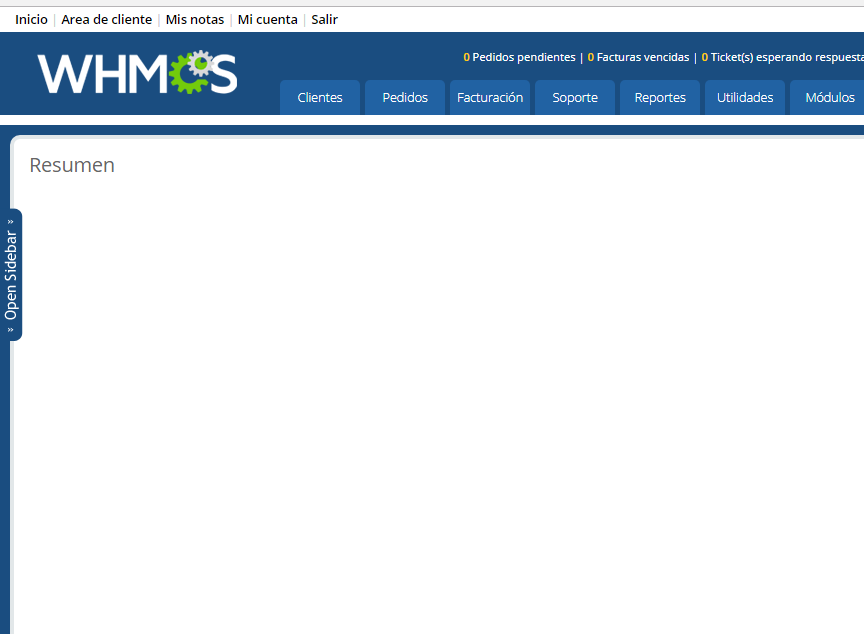
Hi, I have a new issue, I'm not sure if is caused by deactivation of imageMagic. After I login into admin area, the summary page shows empty, no graphics, no information
-
 After an autoupdate, I recieved this message How can I fix this?
 -
Hello all, I recently updated my WHMCS from version 7.0.2 to version 7.1.1. Everything seems to have gone okay except for something I noticed in the customer portal. When logging in as customer and selecting "Services", and going to the Products page that lists the hosting packages for the account along with information like the renewal date and price I am getting the following error: Warning: Invalid argument supplied for foreach() in /home/cpaneluser/public_html/portal/vendor/whmcs/whmcs-foundation/lib/View/Formatter/Price.php on line 0 ("cpaneluser" substituting for the actual cPanel username) For reference, Line 0 of that particular file shows <?php //00ee8 Site is running PHP 5.6 Any help is greatly appreciated!
-
Hey guys! I was unable to find a good way of updating bitcoin currency rates so I decided to create my own module to do this for me and that resultet in Anveto Currency Rates. This addon will update additional currency rates when the daily cron runs or when Anveto cron runs (see downloads here for anveto cron https://anveto.com/members/downloads/2/WHMCS) in order to update currencies multiple times daily. Currently it uses the bitpay (https://bitpay.com/api/rates) to get currency rates but you could set this to any source as long as it follows the same json format. The module costs $10 and can be purchased here https://anveto.com/members/cart.php?a=add&pid=21 It is currently pending community app store review. The source code is not encrypted as I want users to be able to modify this however they would like as long as they purchase the module. I hope some of you find it useful!

-
What is Prpfile Update? Profile Update is a WHMCS addon module that send email notification and show alert message in client area for clients to reminding them to update their profiles in a certain month that the admin can setup from the profile update module settings. Client can go to his profile and update his information than the module will get the date the client update his profile and store it in database to send him notification in the futures. If the client profile is up to date he can click on a button to hide the alert message and update the date in the database Why do you need it? Web Hosting, domain resellers and other companies need their clients profile up to date to send them notification by email or home address. If the client change one of this important information and did not update his profile he may miss renewing his web hosting or domain and then lose his data and domain that's why we developed the profile update module. The profile update module will help WHMCS admin with sending the reminder email to clients every time the clients profile reach a date that admin has setup in the module settings How it works? After installing the profile update module the admin can enter the number of months before the update profile email sent to the client. Also the module will create 2 email templates and by creating the email templates the admin will have the ability to edit the emails subject and message also the admin can use multi language emails. With WHMCS cron job the module will detect all clients that pass the months the admin entered in module settings and then send emails to clients the email will include 2 links the first link is for logging the client automatically without a username and password then take him to his profile to update it. The second link is to confirm that the client profile is up to date and remove the alert message in the client area home page then update the date for the next profile update notification. Also the module will display an alert message in the client area home page to remind the client to update his profile the alert message comes with 2 button one for taking the client to his profile to update it the other button is to confirm that his information is up to date. Finally every time the client updated his profile an email will be sent to notify him if he's the one made the changes to his profile or not Features Ability to setup a certain month Create 2 email templates in email templates section under "General Messages" Notify clients by email to update his profile Notify clients by alert message in client area Notify clients by email every time his profile is updated Automatically logging clients from email and redirect him to profile Confirm button to confirm the client profile is up to date Redirect button to take the client to his profile Module can be translated to any language View the product Page View all our works and Products
-
 Right now, the WYSIWYG editor being used, almost certain is v3 of TinyMC. How do I upgrade to version 4.x? https://www.tinymce.com/docs/demo/basic-example/ I know my pages would load faster (announcements, kb articles, etc), and it would be easier / faster to use. Do I just have to navigate to the /assets/js/tiny_mce folder and overwrite some files?!
 -
After updating to the 6.3 no prices are displayed when I make a product option up/downgrade. All prices are 0.00 in the selection list Has any of you here have a solution?
-
I am looking for whmcs 6.3.0 Patch Sets. I currently have 6.2.2 and I want to upgrade. I just see full releases downloads on this URL: https://download.whmcs.com/ Please advise.
-
 Hi any time there is a update I have to re-make all the customizations. How can I insert or remove lines on my templates using a child or sub system as Opencart (xml) or Wordpress (child themes for css and php functions)? Thank you!
 -
 I had a customer that wanted to pay three months in advance. I added an invoice but if it's paid how will it push the due date o the actual product. Does the subscription ID have to match? Or how does the invoice update the product?


.png.23416405fa74378c1a030a35ebedb864.png)
.png.a2797dfb919063609c787f567eb7b4d4.png)
.png.e3aebde3887c8a7ab6a179b78318d661.png)


