
Search the Community
Showing results for tags 'WHATSAPP'.
Found 7 results
-
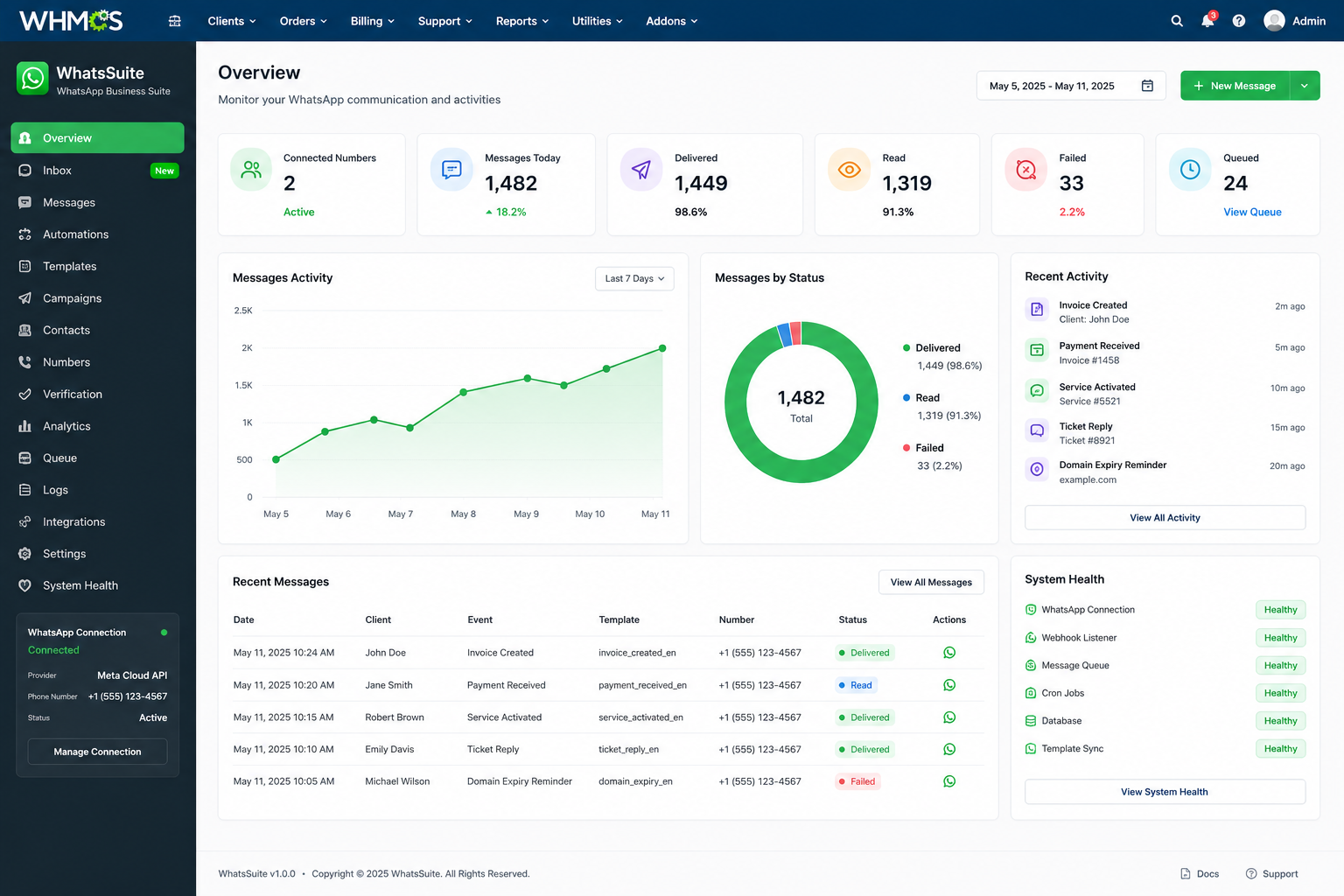
 WhatsSuite - WhatsApp Automation & Business Suite for WHMCS Introducing WhatsSuite, a complete WhatsApp automation and communication suite built specifically for WHMCS. WhatsSuite connects your WHMCS installation with WhatsApp and automates customer communication for invoices, payments, orders, hosting services, domains, support tickets, account activity, reminders, campaigns, and more, all from one centralized dashboard. Whether you run a web hosting company, VPS or cloud provider, domain registrar, agency, or another WHMCS-powered business, WhatsSuite helps you communicate with customers faster while reducing repetitive manual work. WhatsApp Integrations Connect WhatsSuite using multiple WhatsApp providers: Meta WhatsApp Cloud API - Official WhatsApp Business Platform integration Evolution API - Easy WhatsApp connection with QR-based setup Multiple WhatsApp number support Connection status monitoring Webhook management Provider health monitoring Connection testing tools Choose the integration that best fits your business and manage your WhatsApp communication directly from WHMCS. Automated WHMCS Notifications Automatically send WhatsApp messages when important events happen inside WHMCS. Billing & Invoices Invoice Created Invoice Paid Invoice Due Reminders Invoice Overdue Reminders Payment Confirmations Payment-related notifications Orders New Order Order Status Updates Order Payment Notifications Order-related alerts Products & Services Service Activated Service Suspended Service Unsuspended Service Terminated Cancellation Requests Service Status Updates Domains Domain Registration Domain Renewal Domain Transfer Updates Domain Expiration Reminders Configurable renewal reminders before expiration Support Tickets New Ticket Notifications Admin Reply Notifications Client Reply Notifications Ticket Status Updates Support communication alerts Client & Account New Client Registration Account Notifications Password & Security Alerts WhatsApp Number Verification Communication Preference Updates Advanced Template Manager Create and manage professional WhatsApp message templates directly from the WHMCS Admin Area without editing module files. Use dynamic WHMCS variables to automatically personalize every message. Example: Hi {client.firstname}, Your invoice #{invoice.id} for {invoice.total} is due on {invoice.due_date}. You can view and pay your invoice here: {invoice.url} Templates can be configured for different events, providers, and customer languages. Dynamic WHMCS Variables Use information directly from WHMCS, including: Client name and contact information Invoice ID, total, balance, status, and due date Order information Product and service details Domain name and expiration date Ticket information Company information Payment and billing information Custom message data Create your templates once and let WhatsSuite automatically personalize them for every customer. Smart Automations & Reminders Go beyond basic event notifications with scheduled WhatsApp automations. Invoice Reminders Configure automatic messages such as: 7 days before due date 3 days before due date On the due date 1 day overdue 3 days overdue 7 days overdue Domain Expiration Reminders Automatically remind customers: 60 days before expiration 30 days before expiration 15 days before expiration 7 days before expiration 3 days before expiration 1 day before expiration Configure your own timing and decide exactly when customers should receive notifications. Message Queue & Automatic Retry WhatsSuite includes a dedicated message queue designed for reliable automated communication. Messages can be tracked as: Queued Scheduled Processing Sent Delivered Read Failed Retried Cancelled Failed messages can automatically retry according to your configured rules. The queue also helps prevent large notification batches from affecting normal WHMCS operations. WhatsApp Campaigns Send targeted WhatsApp campaigns using your existing WHMCS customer database. Filter recipients using information such as: Client Status Client Group Country Language Currency Product Product Group Service Status Billing Cycle Domain Status Domain Extension Invoice Status Outstanding Balance WhatsApp Verification Communication Preferences Preview your target audience before sending and process campaigns through the WhatsSuite message queue. Contacts Management Manage WhatsApp contacts using your existing WHMCS customer database. View: Customer WhatsApp Number Country Language Verification Status Communication Preferences Last Message Message History Search and filter customers and quickly access their WHMCS profiles. WhatsApp Number Verification WhatsSuite can maintain customer WhatsApp information including: Original phone number Normalized international number Verification status Verification history Communication preferences Phone numbers can be normalized for international WhatsApp communication. Communication Preferences Give customers control over the WhatsApp communications they receive. Preferences can include: Billing Alerts Service Updates Domain Reminders Support Replies Security Alerts Marketing Messages Transactional and marketing communications can be managed separately. Manual WhatsApp Messaging Administrators can also send WhatsApp messages manually from WHMCS. Quick message actions can be used for: Custom Messages Invoice Reminders Payment Confirmations Service Notifications Domain Reminders Support Follow-ups Messages are recorded in the WhatsSuite message history. Media & Invoice Support Depending on the connected WhatsApp provider, WhatsSuite can support: Text Messages Images Documents PDF Invoices Media Attachments WhatsApp Template Messages Message Tracking Monitor your WhatsApp communication from one place. Track: Sent Messages Delivered Messages Read Messages Failed Messages Queued Messages Provider Message IDs Delivery Time Read Time Errors Retry Attempts Delivery and read information depends on the capabilities provided by the selected WhatsApp integration. Analytics Dashboard The WhatsSuite dashboard provides useful insights into your WhatsApp communication. Monitor: Messages Today Messages This Month Delivered Messages Read Messages Failed Messages Queued Messages Delivery Rate Read Rate Message Activity Messages by Event Messages by Provider Campaign Performance Automation Performance Everything is managed through a clean and modern interface directly inside WHMCS. Administrator WhatsApp Alerts WhatsSuite isn't limited to customer notifications. Administrators can also receive WhatsApp alerts for important WHMCS events such as: New Orders New Payments Important Support Tickets Provisioning Failures Service Automation Failures Registrar Errors WhatsApp Provider Problems Queue Failures Critical System Events Stay informed about important activity even when you're away from your WHMCS Admin Area. System Health & Diagnostics Built-in diagnostic tools help monitor your WhatsSuite installation. Check: WhatsApp Connection Provider Status Webhook Status Message Queue WHMCS Cron Database Template Synchronization Failed Messages Module Compatibility Quickly identify configuration or connection problems from one place. Multi-Language Ready WhatsSuite is designed for international WHMCS businesses. The interface and template architecture supports multiple languages, including: English Arabic Spanish French German Portuguese Italian Dutch Turkish Arabic RTL is supported. Create different WhatsApp templates for different customer languages and automatically deliver the appropriate message. Designed Specifically for WHMCS WhatsSuite is built around WHMCS workflows rather than being a generic WhatsApp sender. It integrates communication with: Clients Orders Invoices Products & Services Domains Support Tickets Billing Automation Administrators Manage everything directly from your WHMCS Admin Area. Easy Setup Getting started is simple: Upload and activate WhatsSuite Open the WhatsSuite setup wizard Choose your WhatsApp provider Connect your WhatsApp account Configure your message templates Enable your preferred automations Start sending No WHMCS core file modifications are required. Perfect For WhatsSuite is ideal for: Web Hosting Companies VPS & Dedicated Server Providers Cloud Hosting Providers Domain Registrars & Resellers Web Design Agencies Managed Service Providers SaaS Businesses Any business using WHMCS License & Pricing $49 One-Time One WHMCS Installation One-Time License Fee Easy Installation Multi-Language Support Arabic RTL Support No WHMCS Core Modifications Purchase WhatsSuite WhatsSuite - WhatsApp Automation & Business Suite for WHMCS Purchase WhatsSuite for $49 One-Time One WHMCS addon. One dashboard. Complete WhatsApp automation.
-
WhatsSuite - WhatsApp Automation & Business Suite for WHMCS Introducing WhatsSuite, a complete WhatsApp automation and communication suite built specifically for WHMCS. WhatsSuite connects your WHMCS installation with WhatsApp and automates customer communication for invoices, payments, orders, hosting services, domains, support tickets, account activity, reminders, campaigns, and more, all from one centralized dashboard. Whether you run a web hosting company, VPS or cloud provider, domain registrar, agency, or another WHMCS-powered business, WhatsSuite helps you communicate with customers faster while reducing repetitive manual work. WhatsApp Integrations Connect WhatsSuite using multiple WhatsApp providers: Meta WhatsApp Cloud API - Official WhatsApp Business Platform integration Evolution API - Easy WhatsApp connection with QR-based setup Multiple WhatsApp number support Connection status monitoring Webhook management Provider health monitoring Connection testing tools Choose the integration that best fits your business and manage your WhatsApp communication directly from WHMCS. Automated WHMCS Notifications Automatically send WhatsApp messages when important events happen inside WHMCS. Billing & Invoices Invoice Created Invoice Paid Invoice Due Reminders Invoice Overdue Reminders Payment Confirmations Payment-related notifications Orders New Order Order Status Updates Order Payment Notifications Order-related alerts Products & Services Service Activated Service Suspended Service Unsuspended Service Terminated Cancellation Requests Service Status Updates Domains Domain Registration Domain Renewal Domain Transfer Updates Domain Expiration Reminders Configurable renewal reminders before expiration Support Tickets New Ticket Notifications Admin Reply Notifications Client Reply Notifications Ticket Status Updates Support communication alerts Client & Account New Client Registration Account Notifications Password & Security Alerts WhatsApp Number Verification Communication Preference Updates Advanced Template Manager Create and manage professional WhatsApp message templates directly from the WHMCS Admin Area without editing module files. Use dynamic WHMCS variables to automatically personalize every message. Example: Hi {client.firstname}, Your invoice #{invoice.id} for {invoice.total} is due on {invoice.due_date}. You can view and pay your invoice here: {invoice.url} Templates can be configured for different events, providers, and customer languages. Dynamic WHMCS Variables Use information directly from WHMCS, including: Client name and contact information Invoice ID, total, balance, status, and due date Order information Product and service details Domain name and expiration date Ticket information Company information Payment and billing information Custom message data Create your templates once and let WhatsSuite automatically personalize them for every customer. Smart Automations & Reminders Go beyond basic event notifications with scheduled WhatsApp automations. Invoice Reminders Configure automatic messages such as: 7 days before due date 3 days before due date On the due date 1 day overdue 3 days overdue 7 days overdue Domain Expiration Reminders Automatically remind customers: 60 days before expiration 30 days before expiration 15 days before expiration 7 days before expiration 3 days before expiration 1 day before expiration Configure your own timing and decide exactly when customers should receive notifications. Message Queue & Automatic Retry WhatsSuite includes a dedicated message queue designed for reliable automated communication. Messages can be tracked as: Queued Scheduled Processing Sent Delivered Read Failed Retried Cancelled Failed messages can automatically retry according to your configured rules. The queue also helps prevent large notification batches from affecting normal WHMCS operations. WhatsApp Campaigns Send targeted WhatsApp campaigns using your existing WHMCS customer database. Filter recipients using information such as: Client Status Client Group Country Language Currency Product Product Group Service Status Billing Cycle Domain Status Domain Extension Invoice Status Outstanding Balance WhatsApp Verification Communication Preferences Preview your target audience before sending and process campaigns through the WhatsSuite message queue. Contacts Management Manage WhatsApp contacts using your existing WHMCS customer database. View: Customer WhatsApp Number Country Language Verification Status Communication Preferences Last Message Message History Search and filter customers and quickly access their WHMCS profiles. WhatsApp Number Verification WhatsSuite can maintain customer WhatsApp information including: Original phone number Normalized international number Verification status Verification history Communication preferences Phone numbers can be normalized for international WhatsApp communication. Communication Preferences Give customers control over the WhatsApp communications they receive. Preferences can include: Billing Alerts Service Updates Domain Reminders Support Replies Security Alerts Marketing Messages Transactional and marketing communications can be managed separately. Manual WhatsApp Messaging Administrators can also send WhatsApp messages manually from WHMCS. Quick message actions can be used for: Custom Messages Invoice Reminders Payment Confirmations Service Notifications Domain Reminders Support Follow-ups Messages are recorded in the WhatsSuite message history. Media & Invoice Support Depending on the connected WhatsApp provider, WhatsSuite can support: Text Messages Images Documents PDF Invoices Media Attachments WhatsApp Template Messages Message Tracking Monitor your WhatsApp communication from one place. Track: Sent Messages Delivered Messages Read Messages Failed Messages Queued Messages Provider Message IDs Delivery Time Read Time Errors Retry Attempts Delivery and read information depends on the capabilities provided by the selected WhatsApp integration. Analytics Dashboard The WhatsSuite dashboard provides useful insights into your WhatsApp communication. Monitor: Messages Today Messages This Month Delivered Messages Read Messages Failed Messages Queued Messages Delivery Rate Read Rate Message Activity Messages by Event Messages by Provider Campaign Performance Automation Performance Everything is managed through a clean and modern interface directly inside WHMCS. Administrator WhatsApp Alerts WhatsSuite isn't limited to customer notifications. Administrators can also receive WhatsApp alerts for important WHMCS events such as: New Orders New Payments Important Support Tickets Provisioning Failures Service Automation Failures Registrar Errors WhatsApp Provider Problems Queue Failures Critical System Events Stay informed about important activity even when you're away from your WHMCS Admin Area. System Health & Diagnostics Built-in diagnostic tools help monitor your WhatsSuite installation. Check: WhatsApp Connection Provider Status Webhook Status Message Queue WHMCS Cron Database Template Synchronization Failed Messages Module Compatibility Quickly identify configuration or connection problems from one place. Multi-Language Ready WhatsSuite is designed for international WHMCS businesses. The interface and template architecture supports multiple languages, including: English Arabic Spanish French German Portuguese Italian Dutch Turkish Arabic RTL is supported. Create different WhatsApp templates for different customer languages and automatically deliver the appropriate message. Designed Specifically for WHMCS WhatsSuite is built around WHMCS workflows rather than being a generic WhatsApp sender. It integrates communication with: Clients Orders Invoices Products & Services Domains Support Tickets Billing Automation Administrators Manage everything directly from your WHMCS Admin Area. Easy Setup Getting started is simple: Upload and activate WhatsSuite Open the WhatsSuite setup wizard Choose your WhatsApp provider Connect your WhatsApp account Configure your message templates Enable your preferred automations Start sending No WHMCS core file modifications are required. Perfect For WhatsSuite is ideal for: Web Hosting Companies VPS & Dedicated Server Providers Cloud Hosting Providers Domain Registrars & Resellers Web Design Agencies Managed Service Providers SaaS Businesses Any business using WHMCS License & Pricing $49 One-Time One WHMCS Installation One-Time License Fee Easy Installation Multi-Language Support Arabic RTL Support No WHMCS Core Modifications Purchase WhatsSuite WhatsSuite - WhatsApp Automation & Business Suite for WHMCS Purchase WhatsSuite for $49 One-Time One WHMCS addon. One dashboard. Complete WhatsApp automation.
-
 Hello WHMCS Community! We are excited to showcase PWA Plus, the all-in-one suite designed to modernize your portal, supercharge client engagement, and implement top-tier biometric and OTP security. By eliminating the need for expensive third-:::—zero::party SaaS middleware (like OneSignal, Twilio, respond.io, or Zapier), PWA Plus connects your WHMCS server directly to the native APIs, saving you thousands of dollars in recurring subscriptions. ⚡ What is PWA Plus? (Core Feature Highlights): 1. Fully Installable Mobile & Desktop Apps (PWA) Transform both your WHMCS Client Area and Admin Panel into installable, native-feeling applications. Zero App Store Fees & Approvals: Clients and staff can install the app on their device directly with a single click. Cross-Platform: Full-screen, immersive layouts running beautifully on Android, iOS, Windows, macOS, and Linux. Custom Admin Paths: Completely compatible with custom or renamed admin directories. 2. Native Web Push Notifications & Recurring Campaigns Cut through email noise and reach clients directly on their device screens. Direct & Cost-Free: Connects directly to native browser Web Push APIs. Zero third-party fees. Automated & Recurring Campaigns: Schedule push notifications (daily, weekly, or monthly) to automate follow-ups. Detailed Analytics & CTR: Real-time click tracking, subscriber segment breakdowns (Client vs. Admin), and automatic Click-Through Rate (CTR) calculations. 3. WhatsApp Business (WABA) Campaign & Messaging Suite Build a powerful marketing and transactional channel directly inside WHMCS using the official Meta WhatsApp Business API. Meta WABA Template Sync: Link your Meta account and automatically pull all approved templates directly into WHMCS. Recurring & Transactional Broadcasts: Automate transactional triggers (signups, invoice reminders, ticket replies) and schedule recurring marketing campaigns. Interactive Two-Way Chat (WhatsApp Web in WHMCS): A unified two-panel chat dashboard to reply to clients in real-time. Supports media attachments, native voice recording, emojis, and handles Meta's 24-hour customer service window restrictions. 4. WhatsApp Authentication & 2FA Action Shield Protect sensitive customer transactions by enforcing WhatsApp One-Time Password (OTP) verification checkpoints. Action-Specific Security Gates: Gate login, password resets, profile edits, email updates, domain registrar lock toggles, DNS modifications, and payment method changes behind a secure WhatsApp OTP. 5. Passkey (WebAuthn) Login & Multi-Layer MFA Co-existence Offer passwordless, cryptographic biometric security. Biometric Login: Allow clients and staff to log in with secure biometric verification (Face ID, Touch ID, Windows Hello, or YubiKeys). Multi-Layer Co-existence: Unlike traditional setups that restrict you to a single 2FA type, PWA Plus allows biometric Passkeys and WhatsApp OTP verification to run in tandem with native WHMCS 2FA methods (like TOTP apps). 📊 Feature-Rich Analytics & Admin Dashboard Widgets Monitor your entire platform's performance at a glance from your WHMCS Admin Home page: Web Push Analytics: Track subscriber growth, today's delivery status, 7-day failure logs, all-time sends, clicks, and overall CTR. WhatsApp Delivery & Read Rates: Monitor opted-in contacts, daily volume, delivery rate percentage, and actual template read rates (delivered vs. read counts). Active Chats Inbox Widget: Previews your recent customer conversations and unread counts with quick links to jump straight to the chats. 💰 PWA Plus vs. The Competition (Annual Savings) Web Push Notifications: Third-Party SaaS: $350 - $1,100+/year (OneSignal / PushEngage) PWA Plus: Included (Direct API connection) WhatsApp Campaigns: Third-Party SaaS: $580 - $1,180+/year (Wati / respond.io) PWA Plus: Included (Pay Meta directly at cost with 1,000 free monthly chats) Integration Middleware: Third-Party SaaS: $220 - $580+/year (Zapier / Make) PWA Plus: Included (Native PHP hook system) Total Annual Costs: Third-Party SaaS Stack: $1,170 - $2,960+/year PWA Plus: Flat-Rate Subscription 🛡️ Why Choose Native Integration? Zero Latency: Actions are executed instantly via native WHMCS hooks. No waiting on cron jobs or API bridges. Data Privacy: Customer details, phone numbers, and billing history stay inside your database. No customer data is shared with third-party aggregators. Upgrade-Safe: Built using clean WHMCS hooks and custom modules. Zero core file modifications required. We'd love to hear your thoughts, feedback, or any custom integrations you'd like to see added during our beta phase! Get Started / Try PWA Plus Beta Today!
 -
WA module will add additional notification for your clients using Whatsapp Messenger. Module source code is unencrypted. Feel free to view and open possibility to self-customize. Some notifications which are currently available: Login Alert Password Reset Invoice Information Payment Confirmation Payment Reminder & Overdue Notification Invoice Cancellation Service Activation, Suspension, Reactivation and Termination New Client Registration/Greeting Ticket Notification to client and admin/support team Account Anniversary Additional capabilities: Notification when Mobile Phone used for notification is offline Reminder to recharge if battery is low Autoreply (if not using WA Business) Separate autoreply message template for unsubscribe keyword Forward incoming message to another Whatsapp number Notification Template can be set for dual language (for local language and general/english) NEW! Send Invoice PDF to your client's Whatsapp (optional add-on) API Call to send Whatsapp Message from other application Available in two modes: Realtime (using remote SQL), or Pooling mode (can be used without remote SQL) Compatible with WHMCS v7.10, v8.0 and 8.1 WHMCS Whatsapp Notification Module - Developed By BUANA dotnet

whichautomaticallyselectedbasedonWAprefixphonenumber.thumb.png.46ad8f0081a500e9d81d0e5ce04dd3fb.png)

-
Most users are active on WhatsApp rather than email. Therefore, WhatsApp is a convenient and significant way to maximize sales as it helps to connect and communicate with other businesses easily. For instance, many users keep their phones handy all the time, whether traveling or in meetings. WhatsApp offers a seamless way to stay connected without any delay, like emails. The core features of the module are: Integrated with Twilio Whatsapp API Auto send notification 70+ predefined WhatsApp notification templates Opt-in/ Opt-out WhatsApp Notification Get duplicate copies of all the messages for the Admin Notification Log Top 5 reasons to choose the Whatsapp WHMCS module Immediate Communication Enhance Customer Engagement Increase Sales Opportunities Seamless Integration Marketing Enhancement: https://whmcsglobalservices.com/whatsapp-notification-whmcs-module/ Module price $99.99 After discoucount $79.99 Coupon code : SPECIAL20
-
WaChat WHMCS Whatsapp Notification Module is a fully automated module that will help to grow your business. This module will send all WHMCS default notifications on customer’s WhatsApp numbers and allow the WHMCS admin to schedule custom notifications for specific products/services and for specific WHMCS customers. Auto send notification Our WHMCS WhatsApp Notification Module will automatically send the WHMCS default notifications on customers WhatsApp number. Opt-in/ Opt-out WhatsApp Notification The module will allow your customers to enter their WhatsApp number and Opt-in/ Opt-out WhatsApp notification during signup or later from their profile on your website. Schedule custom notification The module provides a rich feature to schedule your custom notification message for your selected specific customers. Notification Templates Management Module lists the all notification templates based on default WHMCS email templates and admin can enable/disable and change variables for specific notification templates. Auto send notificatioOur WHMCS WhatsApp Notification Module will automatically send the WHMCS default notifications on customers WhatsApp number. Notification Types: Client Registration Client Password Change Client Login Configure alert message templates Invoice Created invoice Cancellation Invoice Paid Invoice Reminder Invoice First Overdue Notice Invoice Second Overdue Notice Invoice Third Overdue Notice Accept Quote Quote Status Change Service Create Service Suspend Service Unsuspend Service Terminated Service Password Change Cancellation Request Domain Registration Domain Transfer Domain Renewal Domain First, Second, Third Overdue Support Ticket Response Features: Send invoice PDF file WhatsApp mobile number Custom field Send bulk messages (Text & Text with media) Change date format Importing and exporting templates Send single and group messages based on variables Can send message using the registered WHMCS user phone number Download
-
This is a very simple addon which lets you sync your Whmcs customers (phone and mobile number) to your gmail contacts. This also will sync to your Whatsapp , as Google pushs your contacts to your phone as soon they are updated in you gmail account (should be the account that you have configured in your android phone) This works only from whmcs to Gmail-Whatsapp The free version: will sync only your first 20 customers. The open source paid version: will sync only your first 3.000 customers as this is a limitation by Google The next version will be updated in real time using Google APIS , will be launched very soon. See more here


whichautomaticallyselectedbasedonWAprefixphonenumber.png.7aa0d7d2da52d0b6996984650a5dae7a.png)


