

-
Posts
92 -
Joined
-
Last visited
-
Days Won
1
About hmaddy

Recent Profile Visitors
2270 profile views


hmaddy's Achievements


-
How to ADD SAC in Invoices.???
-
i cant connect to my domain registrar through their module. showing handshake error. but when i try to check it through terminal manually its connecting. so how to check it and fix it. i checked it with multiple registrars like namesilo, resellerclub and connectreseller
-
Its solved. i used -F flag in cron. i removed it and now its working correctly.
-
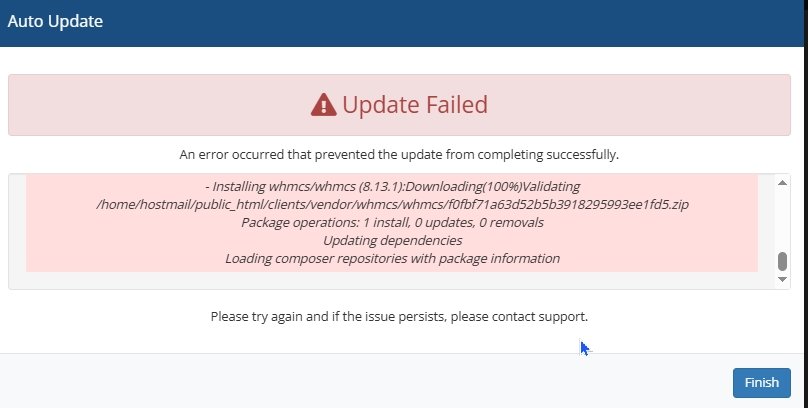
Am using whmcs 8.3 with php74. i would like to upgrade it to latest version and php. but its throwing some errors during upgrade process. Error (Help Documentation) Error: proceeding. ents/crons/). Please verify your existing installation configuration before m crons directory could not be located as configured (/home/public_html/cli A configuration file and/or existing installation has been found, but custo In ComposerInstaller.php line n/a: Script WHMCS\Installer\Composer\Hooks\ComposerInstallerHook::postUpdateCmd handling the post-update-cmd event terminated with an exception ------------------------------------- WHMCS Installation/Update Assistant ------------------------------------- > WHMCS\Installer\Composer\Hooks\ComposerInstallerHook::postUpdateCmd Writing lock file Unzip with unzip command failed, falling back to ZipArchive class The archive may contain identical file names with different capitalization (which fails on case insensitive filesystems) The Process class relies on proc_open, which is not available on your PHP installation. File signature was validated Certificate used for signature validation was loaded and validated File hash was validated. Hash: 6555de4e06a3a717faf7c8030737436c8e4c6a592df04c293e8c07122e80a252 - Installing whmcs/whmcs (8.13.1):Downloading(100%)Validating /home/hostn/public_html/clients/vendor/whmcs/whmcs/f0fbf71a63d52b5b3918295993ee1fd5.zip Package operations: 1 install, 0 updates, 0 removals Updating dependencies Loading composer repositories with package information
-
Am using whmcs 8.3 and using php74. after migration the cron is working every 5 minutes. but the problem is every five minutes full cron is working and every 5 minutes all emails like invoice, payment reminder or all emails in crons works and executes. How to find the root cause of this issue and how can i fix it.
-
Its solved and the login issue due to the PHP session storage location was incorrect:
-
Migrated my whmcs 8.3 to a new server and php version is php74. because some files works only in php74. now whmcs is loading fine. but i cant login to admn area or client area.
-
my current whmcs version is 8.3 and now i would like to upgrade it to 8.13 or latest LTS Version. but when i try to upgrade whmcs admin panel its throwing some error like this Error (Help Documentation) Error: proceeding. ents/crons/). Please verify your existing installation configuration before m crons directory could not be located as configured (/home/public_html/cli A configuration file and/or existing installation has been found, but custo In ComposerInstaller.php line n/a: Script WHMCS\Installer\Composer\Hooks\ComposerInstallerHook::postUpdateCmd handling the post-update-cmd event terminated with an exception ------------------------------------- WHMCS Installation/Update Assistant ------------------------------------- > WHMCS\Installer\Composer\Hooks\ComposerInstallerHook::postUpdateCmd Writing lock file File signature was validated Certificate used for signature validation was loaded and validated File hash was validated. Hash: 6555de4e06a3a717faf7c8030737436c8e4c6a592df04c293e8c07122e80a252 - Installing whmcs/whmcs (8.13.1):Downloading(100%)Validating /home/user1/public_html/clients/vendor/whmcs/whmcs/53f6bd5053104db7d371b82992bde136.zip Package operations: 1 install, 0 updates, 0 removals Updating dependencies Loading composer repositories with package information
-
am using 8.3 version now. i migrated my whmcs to a new server. but now the crons are not wrking properly. And am getting the following messages. Remove dead screens with 'screen -wipe'. #11 /home/mywhmcs/public_html/clients/vendor/whmcs/whmcs-foundation/lib/Installer/Composer/ComposerUpdate.php(0): WHMCS\Installer\Composer\ComposerUpdate->doComposerCommand(Object(Closure)) #12 /home/mywhmcs/public_html/clients/vendor/whmcs/whmcs-foundation/lib/Installer/Update/Updater.php(0): WHMCS\Installer\Composer\ComposerUpdate->getLatestVersion(true) #13 /home/mywhmcs/public_html/clients/vendor/whmcs/whmcs-foundation/lib/Cron/Task/CheckForWhmcsUpdate.php(0): WHMCS\Installer\Update\Updater->fetchComposerLatestVersion() #14 /home/mywhmcs/public_html/clients/vendor/whmcs/whmcs-foundation/lib/Scheduling/Task/AbstractTask.php(0): WHMCS\Cron\Task\CheckForWhmcsUpdate->__invoke() #15 /home/mywhmcs/public_html/clients/vendor/whmcs/whmcs-foundation/lib/Scheduling/Task/AbstractTask.php(0): WHMCS\Scheduling\Task\AbstractTask->execute() #16 /home/mywhmcs/public_html/clients/vendor/whmcs/whmcs-foundation/lib/Cron/Console/Command/AbstractCronCommand.php(0): WHMCS\Scheduling\Task\AbstractTask->run() #17 /home/mywhmcs/public_html/clients/vendor/whmcs/whmcs-foundation/lib/Cron/Console/Command/AbstractCronCommand.php(0): WHMCS\Cron\Console\Command\AbstractCronCommand->executeCollection(Object(WHMCS\Scheduling\Task\Collection)) #18 /home/mywhmcs/public_html/clients/vendor/symfony/console/Command/Command.php(255): WHMCS\Cron\Console\Command\AbstractCronCommand->execute(Object(WHMCS\Cron\Console\Input\CliInput), Object(Symfony\Component\Console\Output\ConsoleOutput)) #19 /home/mywhmcs/public_html/clients/vendor/symfony/console/Application.php(912): Symfony\Component\Console\Command\Command->run(Object(WHMCS\Cron\Console\Input\CliInput), Object(Symfony\Component\Console\Output\ConsoleOutput)) #20 /home/mywhmcs/public_html/clients/vendor/symfony/console/Application.php(264): Symfony\Component\Console\Application->doRunCommand(Object(WHMCS\Cron\Console\Command\AllCommand), Object(WHMCS\Cron\Console\Input\CliInput), Object(Symfony\Component\Console\Output\ConsoleOutput)) #21 /home/mywhmcs/public_html/clients/vendor/symfony/console/Application.php(140): Symfony\Component\Console\Application->doRun(Object(WHMCS\Cron\Console\Input\CliInput), Object(Symfony\Component\Console\Output\ConsoleOutput)) #22 /home/mywhmcs/public_html/clients/crons/cron.php(0): Symfony\Component\Console\Application->run(Object(WHMCS\Cron\Console\Input\CliInput), Object(Symfony\Component\Console\Output\ConsoleOutput)) #23 {main}[mywhmcs@hmserver ~]$ ^C [mywhmcs@hmserver ~]$ /opt/cpanel/ea-php74/root/usr/bin/php -q /home/mywhmcs/public_html/clients/crons/cron.php all -F -vvv^C
-
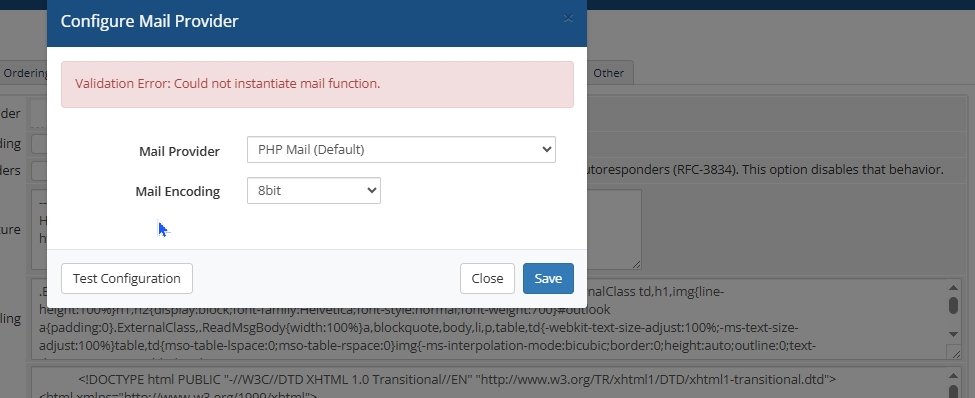
Am using an older version of whmcs and it will work only with php74. i hosted my whmcs on a seperate dedicated server and the server have only this account. And am using external smtp for sending mails. i already configured the /etc/exim.conf.local file. but now the problem is its not working. when i select a test mail, whmcs throwing some error like " Validation Error: Could not instantiate mail function. Server is with cloudlinux 9.6 and using altphp74.
-
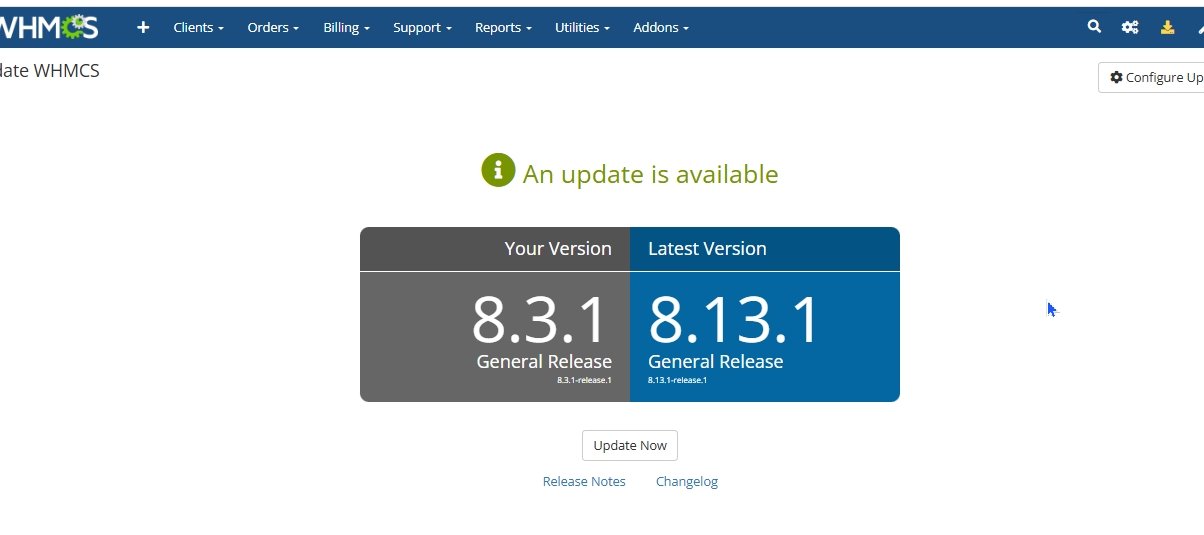
Update is pending now. i have custom made hooks and widgets or edited template. if i upgrade from version 8.3 to 8.13 all these custom made hooks and template will delete or not.
-

WHMCS can not connect to Hetzner dedicate Server
hmaddy replied to yazdandavoodifar's topic in Using WHMCS
Use the Virtualizor API key and API secret in the WHMCS server section for authentication, instead of traditional credentials such as root username and password. Additionally, ensure that the IPs are whitelisted on both the WHMCS server and the Virtualizor server -
We are facing an issue with our support system. Some of our customers are creating multiple tickets at the same time for the same product, which is causing delays in support and service delivery. What we want to achieve is: Allow only one active/open ticket per product for a client. If the client already has an open ticket for a particular product, they should not be able to create another ticket for that same product until the existing one is resolved/closed. At the same time, the client should still be able to open tickets for their other products without any restriction. Is there any built-in feature, hook, or module in WHMCS that can handle this? Or has anyone implemented a custom solution for such a case?
-
i am also facing this
-
added cpanel servers and all its working all functions except whmcs connect. its throwing some error like liner1.mainweb.com refused to connect.
