


Ebin V Thomas
-
Posts
26 -
Joined
-
Last visited
-
Days Won
1
About Ebin V Thomas

Ebin V Thomas's Achievements

Member (2/3)
1
Reputation
-
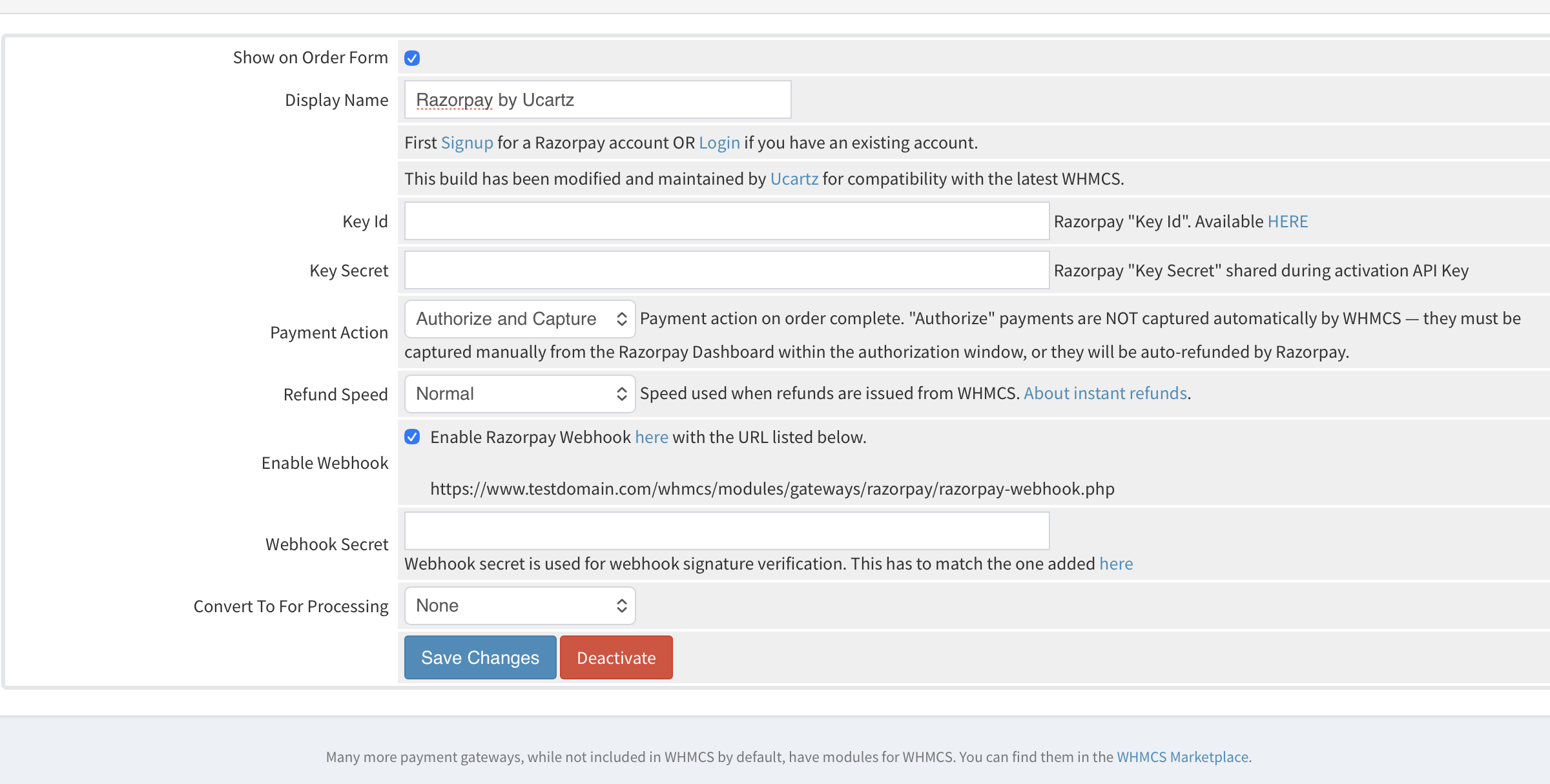
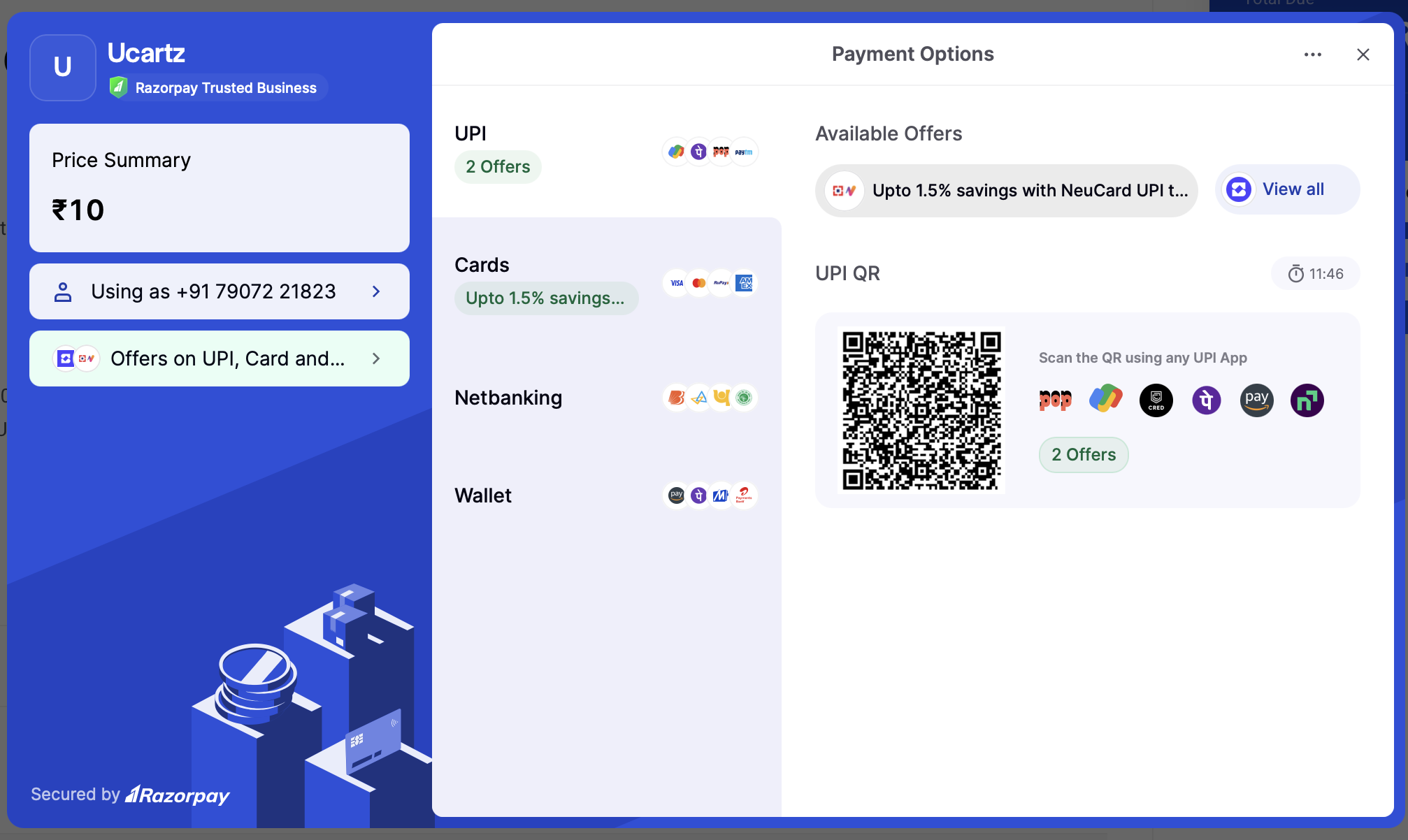
This module is inspired by Razorpay's official open-source razorpay-whmcs plugin, which we found to be full of long-standing bugs affecting real installations — payments silently failing on modern PHP/WHMCS versions, incorrect amounts being credited to invoices, stale checkout sessions, and more. We rebuilt it: fixed the underlying bugs, hardened it for the latest WHMCS and PHP releases, and added functionality (refunds, dispute/chargeback handling, gateway fee tracking) the original never had. It has been tested on Ucartz's own WHMCS installation and on other WHMCS installations, across a range of payment scenarios (standard checkout, partial payments, late fees, refunds, webhooks). Features Full compatibility with WHMCS 9 and PHP 8.2–8.3. Razorpay Standard Checkout using Razorpay's current recommended integration pattern. Accurate invoice crediting — always reflects the amount actually captured by Razorpay for a transaction, never a stale or unrelated invoice value. Database-backed order tracking with safe fallback handling, so a payment attempt is never verified against a stale or incorrect order. Refunds initiated from the WHMCS admin area reach Razorpay, with configurable refund speed (normal / instant). Chargeback/dispute webhook handling — a lost dispute automatically reverses the payment in WHMCS. Actual Razorpay gateway fee recorded against each transaction for reconciliation. Duplicate-transaction protection and signature verification hardened against replay/tampering. Bugs Fixed The official module had a number of serious, long-standing bugs. Here's everything that was wrong and how it was fixed. Payments failing outright on modern PHP / WHMCS Fatal error on PHP 7+: the callback and webhook handlers called mysql_fetch_assoc() / select_query()— mysql_fetch_assoc() is a native PHP function that was removed from PHP core in PHP 7.0. WHMCS 9 requires PHP 8.2+, so this call would fatal-error on any modern install, breaking every payment. Replaced with proper database queries (Capsule ORM). TLS 1.1 forced on every API call to Razorpay: the SDK explicitly pinned the connection to TLS 1.1. TLS 1.1 is rejected by most gateways today — PCI-DSS v4.0.1 requires TLS 1.2+ — so this silently broke the underlying connection to Razorpay's API. Fixed to use TLS 1.2. Outdated vendored SDK: the bundled Razorpay SDK was version 2.8.1 with a HTTP library from 2015. Updated to the latest official release (2.9.3), keeping every other fix intact on top of it. Wrong amounts being credited to invoices The most serious bug: the payment callback credited invoices using the invoice's stored total, not the amount actually captured by Razorpay for that specific transaction. If a customer paid only a late fee, or made a partial payment, Razorpay correctly charged the smaller amount — but WHMCS then credited the invoice's full original total regardless, silently over- or under-crediting the account. Fixed to always fetch and credit the exact amount Razorpay actually captured for that payment. Stale Razorpay order reuse: if a customer opened an invoice, left, and returned after a late fee or credit was applied, the module could reuse a cached Razorpay order created for the old (wrong) amount — including silently reusing it if the API call to re-verify that order failed. Fixed to always create a fresh order whenever the current invoice balance no longer matches the existing order, or whenever that order can't be re-verified. Inconsistent amount rounding: order creation and the checkout form each rounded the same amount differently, causing floating-point "Amount Mismatch" errors. Both paths now round identically. receipt field type rejection: Razorpay's API requires the receipt field to be a string; WHMCS passes invoice IDs as integers, which Razorpay's API rejected outright with expected string but provided .... Fixed by explicitly casting receipt and currency to string. Checkout and signature verification Checkout button not working: the module used an old, auto-embedding <script data-*> checkout pattern that Razorpay's own current documentation says is unreliable — Razorpay requires checkout.open() to be triggered by a direct user click. Rebuilt using Razorpay's current recommended Standard Checkout pattern (explicit button + click handler), which is the likely root cause of long-standing "Pay Now button does nothing" reports. Missing response fields: the checkout form only captured the payment ID from Razorpay's response, never the order ID or signature, so server-side signature verification had nothing to actually verify and would always fail. Fixed by capturing and submitting all three fields. Unreliable session-based verification: signature verification originally depended on a PHP session set when the invoice page was rendered. Under AJAX-driven "Make Payment" tabs, expired sessions, or 3DS/OTP delays, that session could be lost by the time the callback ran, breaking verification for an otherwise legitimate payment. Verification now prioritizes the order ID Razorpay's own checkout handler returns directly, falling back to the database and then session only if that's missing. Null-pointer risk: the database-backed order lookup could crash when no matching row existed instead of failing safely. No duplicate-transaction protection: neither the callback nor the webhook guarded against the same transaction being processed twice. Double slashes in redirect URLs: a trailing slash on the configured system URL produced broken //viewinvoice.php redirect links. Stored-XSS-shaped gap: client name/email and other dynamic values were concatenated directly into HTML/JS without escaping. Fixed with proper JSON/HTML escaping. Missing functionality No refund support: refunds initiated from the WHMCS admin area only updated the local WHMCS record — they never actually reached Razorpay. Added real refund support via the SDK, with a configurable refund speed (normal / instant). Gateway fee never recorded: every transaction showed a hardcoded $0 fee, making it impossible to reconcile actual Razorpay settlement amounts. Now records the real fee (including tax) Razorpay deducts, matching the Razorpay Dashboard. Chargebacks/disputes silently ignored: Razorpay's dispute webhooks were never handled at all — a lost chargeback left the invoice marked Paid and the service running with no reversal and no admin notification. Added full dispute webhook handling: disputes are logged for admin review while open, and a lost dispute automatically reverses the payment in WHMCS (invoice returns to unpaid, standard WHMCS overdue handling takes over). Wrong internal gateway name recorded: the module passed its human-readable display name ("Razorpay") instead of its internal system name to WHMCS's payment-recording function, causing the "Payment Method" column to show blank on the Transactions list and breaking other internal lookups keyed on the module name. Missing company name and other PHP 8 warnings: the checkout modal never showed the merchant's company name, and several $_GET/$_POST accesses and SDK-level deprecation notices were left unguarded on PHP 8.1+. All fixed. Installation Ensure your WHMCS installation is on WHMCS 9 (or WHMCS 6–8) with PHP 8.2 or later. Download this repository. Upload the contents of the modules/ directory into your WHMCS installation's modules/ directory. Configuration Log into WHMCS as administrator (https://yourdomain.com/admin). Navigate to Setup → Payments → Payment Gateways. Choose Razorpay from the Activate dropdown and activate it. Enter your Razorpay Key Id and Key Secret. Optionally enable webhooks and set the Webhook Secret to match what you configure in the Razorpay Dashboard. Click Save Changes.
-
Thank you for the clarification and the documentation link. I understand that this is now intended behaviour and that the recommended workflow is to create a Draft Invoice, make changes, and then publish it. However, we have a few practical workflow concerns and would appreciate guidance. Linking New Invoice to Existing Service If we cancel an unpaid invoice and manually create a new one, the newly created invoice is not automatically linked to the original service. It becomes a separate invoice not associated with that service’s billing cycle. For example: A service invoice is generated with a late fee. The customer requests removal of the late fee. Now we must cancel the original invoice. If we create a new invoice manually without the late fee, it does not remain properly connected to the service renewal. Is there a supported way to create a replacement invoice that remains linked to the existing service and billing cycle? If the new Draft Invoice workflow allows proper tagging or association with the existing service, that would solve our concern. Editing Invoice Line Items for Adjustments Earlier, we could edit the invoice line item description and adjust the amount. For example: Mention “Special pricing adjustment for this month” Reduce invoice amount by half Keep everything within the same invoice record Now that unpaid invoices cannot be edited, this flexibility is gone. The only option appears to be cancellation and re-creation, which breaks continuity and increases administrative overhead. Is there a recommended best practice for handling such partial adjustments while keeping service linkage intact? Partial Usage / Refund Scenarios Another scenario: A customer pays via direct transfer. We add funds manually and deploy the service. After 20 days, the customer requests a refund for the remaining 10 days. We process a partial refund externally. If we want to: Calculate usage Deduct our effort or processing charges Clearly document the breakdown in an invoice format How should this be handled under the new workflow? Is it possible to generate an adjustment invoice or credit note that clearly reflects these calculations and keeps accounting clean? We fully understand the intent behind protecting invoice integrity, especially for compliance and audit reasons. Our main concern is maintaining service linkage, transparency, and clean billing history while still handling real-world adjustments. Appreciate any clarification on best practices under 9.0.1. Thank you.
-
did you fixed this issue ?
-
Hello Everyone, We are currently using WHMCS version 9.0.1 and after upgrading, we have noticed two issues related to invoice management and staff permissions. We would appreciate clarification from the community. Unpaid Invoice Cannot Be Edited When trying to modify an unpaid invoice, the system shows: "This is an Unpaid Invoice. You cannot modify an Invoice that is Unpaid." Previously, we were able to edit unpaid invoices in cases of pricing corrections, tax adjustments, or client-requested changes. We are unable to find any setting that allows editing unpaid invoices in version 9.0.1. Is this now the intended behavior? Is there any supported method to allow editing unpaid invoices without marking them as paid first? Cancel Invoice Permission Requires Delete Permission We assign the "Cancel Invoice" permission to specific employees so they can cancel invoices when there are billing errors or mismatches. The cancel action keeps proper logs and maintains an audit trail, which is important for internal control. However, it appears that the Cancel Invoice permission now requires the Delete Invoice permission to function. This forces us to grant both Cancel and Delete permissions. This creates a concern because if Delete permission is given, staff may delete invoices instead of cancelling them. Deleted invoices do not provide the same level of audit visibility, and it becomes difficult to track what was removed and why. Our requirement is to allow invoice cancellation with proper logging, but not allow invoice deletion. Has anyone else faced this in 9.0.1? Is this expected behavior, or is there a way to separate Cancel and Delete permissions properly? Looking forward to feedback from the community. Thanks in advance.
-
There is a problem with that. if google crawled somehow the old non-SEO-friendly URL, it gives the wrong canonical URL. for example with knwoldeg base article: if a URL is like domain.com/clients/index.php?rp=/knowledgebase/920/test.html , then the canonical URL will be like below <link rel="canonical" href="https://www.domain.com/clients/index.php"/> . It's the wrong URL. so we need to add separate lines for KB, announcement and other system URLs in code . like below for kb : href="https://www.website.com/whmcs/knowledgebase/{$kbarticle.id}/{$kbarticle.urlfriendlytitle}.html
-
No one replied yet. ! as per the support response,i created a hook and added below code. But still its not working <?php add_hook('ClientAreaHeadOutput', 1, function($vars) { $template = $vars['$template']; $SystemURL = 'https://www.domain.com'; $url = "https://$_SERVER[HTTP_HOST]$_SERVER[REQUEST_URI]"; $url = strtok($url, '?'); return <<<HTML <link rel="canonical" href="{$url}"/> HTML; }); also tried the below code, still not working. can anyone help ? <?php add_hook('ClientAreaHeadOutput', 1, function($vars) { $template = $vars['$lagom2']; $SystemURL = 'https://www.domain.com'; $url = "https://$_SERVER[HTTP_HOST]$_SERVER[REQUEST_URI]"; $url = strtok($url, '?'); return <<<HTML <link rel="canonical" href="{$url}"/> HTML; }); can anyone help
-
SEO issue due to multi language in KB
Ebin V Thomas replied to Ebin V Thomas's topic in Developer Corner
Now I am able to fix the meta tag description issue on KB articles. But issues is still there for KB tag , announcement and store pages ! -
SEO issue due to multi language in KB
Ebin V Thomas replied to Ebin V Thomas's topic in Developer Corner
Sure. Here is the code. {if $templatefile == "knowledgebasearticle" || $templatefile == "viewannouncement"} <meta name="description" content="{if $templatefile == "viewannouncement"}{$summary|truncate:155:"..."}{elseif $templatefile == "knowledgebasearticle"}{$kbarticle.text|strip_tags|truncate:155:"..."}{/if}"> {/if} -
Hello, We enabled WHMCS with fully SEO friendly URL. So when we open a KB , the URL's will be open like https://website.com/knowledgebase/254/testarticle.html We created new sitemap with all these URLs and submitted on search engine . But we can see "canonical URL" need to mention in each page code. so when we inquire, we able to understand , if we add below mentioned code in "header.tpl" , it will fix the error . but I am worried if the "canonical URL" set is completely different with the url mentioned in sitemap , it affect our SEO. Can anyone suggest something to fix this issue.
-
SEO issue due to multi language in KB
Ebin V Thomas replied to Ebin V Thomas's topic in Developer Corner
I am able to fix this issue with he help of our template developers. Thank you -
SEO issue due to multi language in KB
Ebin V Thomas replied to Ebin V Thomas's topic in Developer Corner
file : /templates/templatename/includes/common/seo.tpl please suggest , how we can implement {if file_exists("templates/$template/includes/common/overwrites/seo.tpl")} {include file="{$template}/includes/common/overwrites/seo.tpl"} {else} <title> {if isset($pageSeo['title'][$language]) && $pageSeo['enabled']} {$pageSeo['title'][$language]} {elseif $kbarticle.title} {$kbarticle.title} {elseif $templatefile == "viewinvoice" || $templatefile == "viewquote" || $templatefile == "clientareahome"} {$pagetitle} {else} {$displayTitle} {/if} - {$companyname} </title> {if $pageSeo['enabled']} {if isset($pageSeo['description'][$language])}<meta name="description" content="{$pageSeo['description'][$language]}">{/if} {if isset($activeDisplay) && $activeDisplay == 'CMS'} <meta name="robots" content="{if $pageSeo['robots'] == 0}noindex nofollow{else}index follow{/if}"> {/if} <meta name="og:type" content="{if $templatefile == 'homepage'}website{else}article{/if}"> <meta name="og:title" content="{if isset($pageSeo['title'][$language])}{$pageSeo['title'][$language]}{else}{$displayTitle}{/if}"> {if isset($pageSeo['description'][$language])}<meta name="og:description" content="{$pageSeo['description'][$language]}">{/if} {if isset($pageSeo['image'])}<meta property="og:image" content="{$systemurl}templates/{$template}/assets/img/page-manager/{$pageSeo['image']}">{/if} <meta name="og:url" content="{$systemurl}{$smarty.server.REQUEST_URI|ltrim:'/'}"> <meta name="twitter:title" content="{if isset($pageSeo['title'][$language])}{$pageSeo['title'][$language]}{else}{$displayTitle}{/if}"> {if isset($pageSeo['description'][$language])}<meta name="twitter:description" content="{$pageSeo['description'][$language]}">{/if} {if isset($pageSeo['image'])}<meta property="twitter:image" content="{$systemurl}templates/{$template}/assets/img/page-manager/{$pageSeo['image']}">{/if} {/if} {/if} -
SEO issue due to multi language in KB
Ebin V Thomas replied to Ebin V Thomas's topic in Developer Corner
Thank you for the replay .I am little bit confused , I am a adding my template header file code here , can you suggest the edit {if file_exists("templates/$template/overwrites/header.tpl")} {include file="{$template}/overwrites/header.tpl"} {else} <!DOCTYPE html> <html lang="en" {if ($language == 'arabic' || $language == 'hebrew' || $language == 'farsi') && file_exists("templates/{$template}/assets/css/theme-rtl.css")}dir="rtl"{/if}> <head> {if $filename=='clientarea' or $filename=='login' or $filename=='register' or $filename=='cart'} <meta name="robots" content="noindex,nofollow" /> {else} <meta name="robots" content="index,follow" /> {/if} <meta charset="{$charset}" /> <meta http-equiv="X-UA-Compatible" content="IE=edge"> <meta name="viewport" content="width=device-width, initial-scale=1.0, maximum-scale=1.0, user-scalable=0"> {include file="$template/includes/common/seo.tpl"} {include file="$template/includes/head.tpl"} {$headoutput} </head> <body class="lagom{if $bodyClasses} {$bodyClasses}{if $bodyClasses|strstr:'page-login' && $RSThemes.pages[$templatefile].name != 'sidebar'} page-login-{$loginBgStyle}{/if}{/if}{if !$loggedin} lagom-not-portal{/if}{if $RSThemes.layouts.vars.bodyClass} {$RSThemes.layouts.vars.bodyClass}{/if}{if $RSThemes.styles.vars.bodyClass} {$RSThemes.styles.vars.bodyClass}{/if}{if !$templatefile|strstr:"/"} page-{$templatefile}{/if}{if $pageModuleName} page-{$pageModuleName}{/if}{if $module} page-{$module|lower|replace:" ":""}{/if}{if $mgCaResult['vars']['mainName']} page-{$mgCaResult['vars']['mainName']|lower|replace:" ":""}{/if}{if $loggedin} page-user-logged{/if}{if $RSThemes['pages'][$templatefile]['config']['isFullPage'] == "1" || $RSThemes['pages'][$templatefile]['optionvars']['isFullPage'] == "true" || $templatefile=="oauth/layout"} page-type-full{/if}" data-phone-cc-input="{$phoneNumberInputStyle}"> {if $lagomClientAlerts->header} {$lagomClientAlerts->header} {/if} {$headeroutput} {if isset($RSThemes.layouts)} {include file=$RSThemes['layouts']['mediumPath']} {else} {include file="templates/{$template}/core/layouts/main-menu/default/default.tpl"} {/if} {/if} -
SEO issue due to multi language in KB
Ebin V Thomas replied to Ebin V Thomas's topic in Developer Corner
Also "Meta Description tag missing" in KB article pages. Is there any way we can fix that in bulk ? -
Adding SEO and Keywords / global and page specific
Ebin V Thomas replied to spartanza's topic in Developer Corner
How to fix all "Meta Description tag missing" errors in KB by bulk. can anyone suggest -
Hello, I was facing SEO "duplicate contents" issues in whmcs due to whmcs multi-language and cart pages indexed in google. So to prevent google indexing, I edited the modules/{template}/header.tpl. And add the below tag; I believe it will avoid google indexing of clientarea.php "pages", login and register and cart. Since we are using WHMCS KBs for writing FAQs and support articles, we must allow KB pages to be indexed in Search engines. But we need to avoid multiple language page indexing. Because it harms our website SEO, can anyone suggest something to fix this? {if $filename=='clientarea' or $filename=='login' or $filename=='register' or $filename=='cart'} <meta name="robots" content="noindex,nofollow" /> {else} <meta name="robots" content="index,follow" /> {/if} We are using whmcs "lagom" templates. How we can fix KB multi language page duplicate entries and avoid SEO issues.
