


zitu4life
-
Posts
616 -
Joined
-
Last visited
-
Days Won
3
Content Type
Profiles
Forums
Events
Hotfixes
Everything posted by zitu4life
-
I think this kind a post is not suitable in WHMCS native community, but I do not think you can just replicate it in 2 years and or 5 years...WHMCS is here for over 20+ years. But a group of lot of human were involved. And unless AI can decode in full all encrypted files, a human must direct AI direction to follow, and huge work on prompt. I have AI to helped me fix an issue in WHMCS that even WHMCS support could not be able in same pace, but replicate WHMCS is another conversation. So no, it will not happen sooner.
-

custom billable items Custom billable items description
zitu4life replied to zitu4life's topic in Developer Corner
a quick update @towhiddex many many thanks, it works!!!!!!!!!!!! -
custom billable items Custom billable items description
zitu4life replied to zitu4life's topic in Developer Corner
Hi @towhiddex Thank you for taking your time with me. I have aplied this hook, I tried to create imediately new billable item on next cron, but no invoice was generated, not sure why yet..but let me test it more and will post here. -
custom billable items Custom billable items description
zitu4life posted a topic in Developer Corner
Hello, I have searched on the community and did not find yet a solution, also have tried my self and not successfully. I want to invoice in a daily basis a custon product, and realizing that billable items do that, which is great! But the issue is that I want to add automatic date on each of these new invoice that will be created by billable itens. have tried so far this.. but using {DAY}-{MONTH}-{YEAR} on the description will not display it as 03-12-2025 I suspect WHMCS accepts HTML code or smarty code templates that will do that, but can no do it at this. If anyone can advice or help. I got this, bu I need it to display actually date the invoice was generated, so evey new invoice to display actual date on the desciption. This is what I look for... Thank you!!!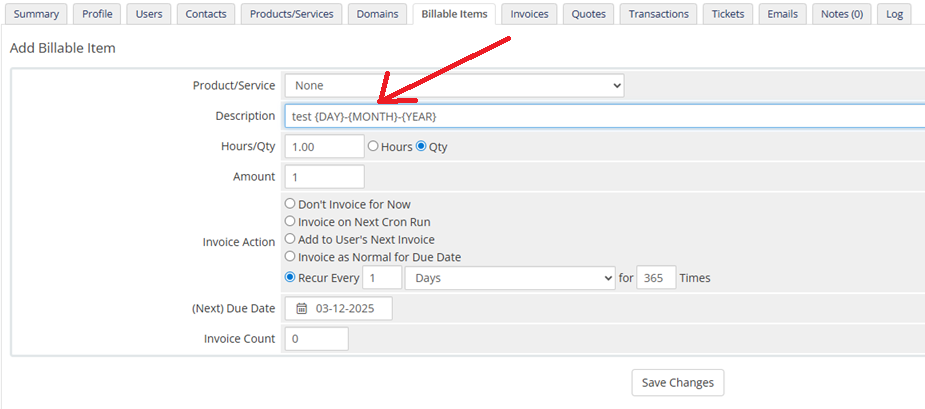


-
Updating from 8.11 to 8.13 automatic update error
zitu4life replied to zitu4life's topic in Troubleshooting Issues
already opened a ticket Ticket #VNK-093034 and provide access to the instaltion for further look PS: I have a monthly license -
Updating from 8.11 to 8.13 automatic update error
zitu4life replied to zitu4life's topic in Troubleshooting Issues
Now got this Unable to complete incremental updates: Unable to import the 8.12.0 database file. Unable to import /home/my_folder_name/public_html/resources/sql/upgrade8120release1.sql: SQLSTATE[42S22]: Column not found: 1054 Unknown column 'upsell_from_products' in 'tblhosting' I suspect this issue is related to fact I did not upgrade to 8.12 before going to 8.13, if that is the case WHMCS needs to adress this before General public release of v8.13 -
Updating from 8.11 to 8.13 automatic update error
zitu4life posted a topic in Troubleshooting Issues
Hello there Trying automatic update via browser from 8.11 to 8.13 and stuck on this SQL error. What could be next steps to fix this SQLSTATE[42S02]: Base table or view not found: 1146 Table 'my_sql_database.tblticketactions' doesn't exist (SQL: select * from `tblticketactions` where `action` = AssignTicket order by `tblticketactions`.`id` asc limit 1000 offset 0) My configuration before start installation regards
-
Welcome @Michael Finley to WHMCS community. You are at great place to start learning, and automation is core of WHMCS. I started using this software back 2017 mostly because of that powerfull automation, and not exactly by webhosting, but got and learned a lot in this community that now I own a hosting business, and every day new things to learn. WHMCS automation allowed me to had a business working almost alone while I have my regular job. Welcome! when I start I ordered a license, ordered server\VPS opened a ticket, ask support to get first contact with software and now I am almost on autopilot
-
disable email sending for specific customer
zitu4life replied to sokalsondha's topic in Developer Corner
Would be nice if WHMCS supports this by default, but no at this time. What I have been done (not best solution) is to modified customers email that I do not want email to be sent autonamtically, them WHMCS will try to send and fails and later I will manually revert it and sent it. usually in admin custumer summary page I add original email, (some of copy and paste).... it quite works for me because these customers never login to the customers area, but if it is not your case there is an issue, because if you modify email they can not login...yes I have this on my terms and use service that I do this, or even create fake emails to customers under my domain to allow that custumer to be registered on WHMCS. I have some customers that do not have email, and amanualy we create it (sokalsondha@mydomain.com) etc etc... It is shame that WHMCS do not create this optiopn by default.🤔 -
Imediately after update my WHMCS I had that error too.My website is using Cpanel and WHM version is 110 from A2hosting servers. I am using cloud flare from several years and I had WHMCS support to point me how to setup it years ago, so it was well configured I assume and this issues just happen after new WHMCS version
-
I can see advantages on this futures, but none WHMCS versions supports this. Would be very useful. You could also use this future to suggest customers yearly or 2 yearls subcriptions price so they could reply to your automated emails asking at any time to change packages.
-
Hi guys... @DennisHermannsen and @Evolve Web Hosting many thanks for following up with me....I think I have address my issue, but good is to wait at least 24 hours. I have learn a lot of these last 6 days getting crazy with CRON not working... Have tried a lot of things...and you guys make me thing out of the box!! While WHMCS support was pointing me to look at cron logs and also vvv >> crondebug.txt which wasn't been recorded due to cron was even tries to start to be logged...I have to make lot of tests because have happened: 1. WHMCS update 2. Server Migration 3. Changing from VPS that can ran al version of cron to reseller that is managed by hosting provider that has it only working on php72 by internal polices. All these things make it hard make cron work again easily. How I adress this. First: testing all php version I find out that on php7.2 cron will run, this mean I will be slave of my hosting provider, if someday it stops sudenly I need to test if hosting provider has changed it php73 php74 or php81 but I can leave with that😅 Second: After re-uploading all WHMCS files again it starts working, so I suspect that as I was using cron folder localy instead on public_html folder, during browser auto-update cron folder remains from WHMCS v8.5 that I suspect was not compactible with WHMCS v8.8...I know that during all trobleshooting I moove cron folder to public_html for testing purpuses and perhaps I did not use new cron folder from v8.8 and keeping using cron folder from v8.5 due perhaps some mistake (tired mind 😷) Third: After re-uploading all folder installation it replaces cron old folder from whmcs v8.5 and like magic cron starts works again.👌 Will wait 24hours, leaving it overnight but I am confident that it is OK now. PS: Would be nice if WHMCS during browser auto-update advise you...We detect that cron folder is not on default folder, remember to update it after installation!!! Thanks to WHMCS support team, thanks to my Hosting support specialist, thanks to WHMCS community users. Hope now I can activated a automatic pilot again ✈️✈️✈️
-
thank you all for keeping supporting me. defenitely I should use /opt/cpanel/ea-php72/root/usr/bin/php -q /home/fakeuser/public_html/crons/cron.php despite using cloudlinux ✔️ But I was thinking that it is mandatory to match php version and cron version to WHMCS works, but my dev proves not. On my dev running on same server I have php loader 8.1 and cron php version 7.2 🙄 And My production website I tried the same and not work. PS: My website production running WHMCS v8.8 lastest version and my dev are running v8.7 I will try update my dev to v8.8 and see if it will starts fails.. This issue is getting me crazy, because cron is important from my business.
-
thank you guy for keep following up with me... You are right I have correct it by it only run cron if I realized testing on my dev that it requires to use /opt/cpanel/ea-php PS: It looks my dev installation on same server are able to run cron using cron php72 and also php loader php8.1 just tested it.... as I did not find anything confiential here is what I have , some values I have tryed to use diferent values as testing purpose., please see if something can help..

-
On WHM I have this I have search on systemphpinfo.php and there a lot of /opt/alt/php81 I am not familar with website's .htaccess I tried to modify cron line to this using alt/php81 does it make senses?...


-
My hosting provider just informed me that they can not change the version of the server from 7.2 to 8.1 since there are many customers on the server. For god sake!!! Does WHMCS plataform can run cron even if there is a mismatch for example? My server has cron 7.2 and I am running loaded PHP version (8.1.22).
-
Hi @DennisHermannsen thank you for taking your time and efort to read and point some possible cause of my issues... At this time I have disable all hooks and all modules, cruently I am only using 2 modules and have switched them off during this trobleshooting... Now I find out that my WHMCS are point me systemhealthandupdates.php a Cron PHP Version Mismatch what looks to be root cause maybe.... But I have it configured right I guess..please look at my 2 print below... If WHMCS says there is a mismatch means that my server could be running cron at php72 even in my cpanel are right? My hosting administrator can resolve this issue???? what should I say to my hosting adminsitrador to change exactly? -------------------------------- on cpanel I have this... on cpanel cron I have this... How can I enforce cron mismatch syncronization? PS: my cron runs 15 to 15 minutes due to hosting polices, but no problem with that. Why WHMCS detects mismach if I gave it correctly, and it answer automaticaly why it works ONLY on php72, because on php72 will match CRON


-
Hello there Have you ever faced similar crazy issue like this!!!!! It is been 6 days and no solutions. My WHMCS insists and give me headache regarding cron invocation and no one is able to find a solution (6 days with this issues so far). I updated my WHMCS that was on version 8.5 (using php7.4) to version 8.8 (also start using php8.1 for the first time on my installation). Installation were made using browser auto update following oficial tutorial and everything was OK. Over last 3-4 years I have been using WHMCS on VPS and took decision to leave VPS and moove to reseller package bundle with WHMCS license. Migration was smooth made by hosting specialist support. After updating WHMCS I proceed with migration from another server with another IP address. On this new server I am having cron issues that never imagine headache like this, that no one is able to find root cause and a solution. My hosting support specialist inspected my cpanel account and nothing shows wrong, cron logs shows that cron invocation happens. WHMCS support can't be able so far to point possible root cause. My development instalation that still running on same server after migration too was working with cron with no fail using php72..🙃...after note that I tried to test php72 on my main website and it worked with no fail also... So my situation is that now cron only works on php72....not work on php73...not work on php74 and not work on php81 I can not leave with php72 on 2023, please if you think I should start loot at something please advice. I do not intend revert migration to VPS again due too higher costs envolved, so hope I can find a solution. Is there any php extention that are related to cron that I should look at? My cpanel are invoking a cron on all php version but WHMCS only detected pit on php72 I guess... PS: when enforcing cron to run it responds completing all tasks My active WHMCS ticket #IXY-976942

-
I just performed update comming v8.5 to 8.8 using browser auto update and it works OK
-
How can I achieve this | Customer Summary page
zitu4life replied to zitu4life's topic in Developer Corner
Many thanks @Kian for taking your time to point me the diretion how can I achieve my needs, I will try on the next 2 3 days, as my coding skills are limited, but as the code gets job done, I am happy with it. Thank you! -
Hello there I would like to add some pictures on each customer Summary page on add File native whmcs inbuilt option. No problem with it, but the issue is...after upload picture, if I need to watch it,but the way WHMCS process it now, it will request me to download that attached picture, but i just need to see it online and not download it. After add a picture, it only allow me to download it, and not see it online. I understand it where design to be like this, but as clientsummary.tpl is not encrypted I was wondering if this can be changed or add an option to see it online or choose to download it. WHMCS support my requests because on project management add on I can do that (see picture online), please see picture for project management. Thank you!!! PS: How this can help me. Not all countries has a reliable GPS address where you can just add address and google maps shows you exactly location even some cases on 3D with pictures of front house. My company provides support to hundred of customers and having accurate address will less stress information to be passed inter-staff...WHMCS is nice because it centralize information for all. So, for country on 3rd world GPS will takes years to be like Europe or USA...So we have update our terms and service that allows consent for customers to treat these information for better customers support and time saver. So with address together with picture, a staff will know exactly customers building.


-
great explanation.
-
Hello there Any update regarding WHMCS mobile app. Thank you.
-
Suspicious email with WHMCS footer logo hardcoded
zitu4life replied to zitu4life's topic in Using WHMCS
@bear it comes from contact.php form on the client area theme. Advice is not use that for and instead use support department with additional human verification The additional human verification we would typically recommend adding would be the google hidden reCAPTCHA system as this is designed to detect bots prevent automated messages from being submitted via ticket. Those bots are terrible...they send message like if you are sending message to yourself, using SMTP... -
Suspicious email with WHMCS footer logo hardcoded
zitu4life replied to zitu4life's topic in Using WHMCS
I have open a ticket to request WHMCS experts to look close...it looks like it is been sent from my server (managed VPS). I have sent WHMCS a full email header... The strange thing is like this email is send it using WHMCS installation and also email is sent out using SMTP


