


N8Solutions
-
Posts
21 -
Joined
-
Last visited
Content Type
Profiles
Forums
Events
Hotfixes
Everything posted by N8Solutions
-
Turn off "Hide Inactive Clients" for good?
N8Solutions replied to garybarr's topic in Admin & Configuration Questions
@brian! Thank you for that information and for letting me know the hook wouldn't have an effect on the dropdown list of clients. -
Turn off "Hide Inactive Clients" for good?
N8Solutions replied to garybarr's topic in Admin & Configuration Questions
Has anyone tried this code? Does it work? I thought I could get use to the inactive clients being hidden but I just find it very annoying. The inactive clients aren't visible from the dropdown when looking at another client so I have to go back to the client screen, click to show the inactive clients, then click on the client I want to see. This has created too many unnecessary steps. -
Change VAT Number to TAX ID/VAT on order form
N8Solutions replied to N8Solutions's topic in Admin & Configuration Questions
@Remitur Thank you for the extra information. Regardless of how Tax ID & VAT is defined in each country, when someone is signing up for service, they will know ahead of time if the invoice will be submitted to their tax office as a business expense which means they will know what needs to be entered in that field. -
Change VAT Number to TAX ID/VAT on order form
N8Solutions replied to N8Solutions's topic in Admin & Configuration Questions
Hello @Kian I clarified this with WHMCS Support and they had this to say. With this information it means there is absolutely no issue with changing the field to say "Tax ID / VAT Number". -
Change VAT Number to TAX ID/VAT on order form
N8Solutions replied to N8Solutions's topic in Admin & Configuration Questions
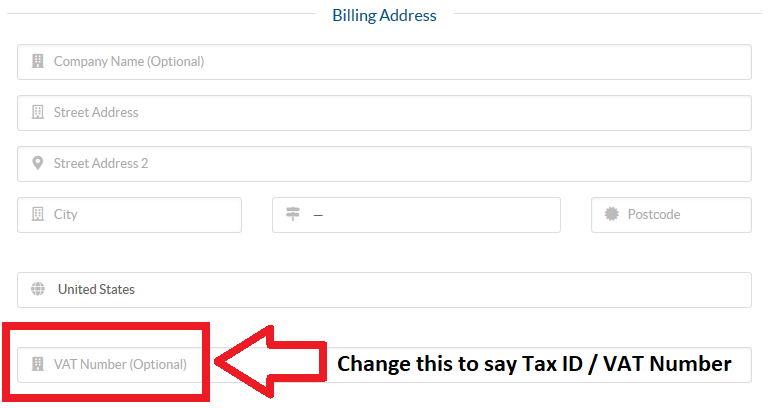
Hello @Kian, Thank you for the reply! Am I missing something here? I am under the impression that the VAT Number field on the order form is the same thing as a businesses Tax ID Number. Is this not the case? The whole reason I'm looking to modify this is because I deal with a lot of customers in the USA and they do not understand what VAT stands for so I'm constantly answering this question. Having it say "Tax ID / VAT Number" instead of just "VAT Number" would be helpful. -
Hello, Is it possible to change VAT Number to say TAX ID/VAT on the order form in the field highlighted in the attached picture? kind regards
-
SSL Check under /clientarea.php?action=services
N8Solutions replied to wp4all's topic in Admin & Configuration Questions
@brian! Thank you for the explanation. Yes, I am using a custom template. When I have more time, hopefully this weekend, I will review this more closely to compare your suggestions to see how I might be able to modify them for my template. In the meantime I will be sure to keep an eye on this topic. Thank you again for your help! -
SSL Check under /clientarea.php?action=services
N8Solutions replied to wp4all's topic in Admin & Configuration Questions
Thank you both very much for your replies! @brian! I tried your suggestion but even after implementing it the padlock was still visible and it still had a line for the SSL Status saying "No SSL Detected". @gei Your suggestion of using the files from the v7.6 template worked flawlessly. I logged in as a client and was not able to see anything indicative of SSL Status. It is still visible in the admin section but that's fine. As long as the customer can't see it this works! -
@13i Global Here is another thread you should read regarding the SSL Certificate Status not working properly.
-
SSL Check under /clientarea.php?action=services
N8Solutions replied to wp4all's topic in Admin & Configuration Questions
@gei Not to second guess you, but are you 100% absolutely sure that this will solve the problem without creating any other issues? Can anyone else verify that this will work? @WHMCS John As I asked before, please elaborate on this. I believe WHMCS owes it to it's customer base to provide a way to remove the SSL certificate status since this feature is clearly problematic. We shouldn't have to fend for ourselves here. -
SSL Check under /clientarea.php?action=services
N8Solutions replied to wp4all's topic in Admin & Configuration Questions
@WHMCS John Would you please be a bit more specific with how exactly those 2 files should be modified in order to turn off the SSL check? Even better would be if you or someone else from WHCMS uploaded the modified files here so the rest of us do not have to go through the hassle of modifying them ourselves. -
@agarzon I reported this SSL error back on the 23rd and received a reply the same day that WHMCS support was able to replicate the issue and opened case #CORE-13120. I must say I am concerned about your last finding regarding the SSLSync cron task searching through so many old domains. In my opinion it should be restricted to searching through active domains only. @WHMCS John Is there a way we can turn this feature off until this is fixed? I have had a few of my clients contact me directly because they were concerned if their site was really secured with a certificate.
-
@d9hosting I was not able to speak to them about this. I contacted them about becoming a customer but they are not able to onboard customers from Greece yet. Still, if you are able to find out anything I would appreciate knowing for future reference.
-
Drag & Drop Dashboard Widgets
N8Solutions replied to pRieStaKos's topic in Admin & Configuration Questions
I am able to move the widgets around BUT when I "Minimize" or "Maximize" the "MarketConnect" widget by clicking the arrow it moves back to its original position of Top & Center instead of staying in the position it was placed in. This behavior definitely seems like a bug, and Yes, I have cleared the cache. With all of the other Widgets they stay in the position they were placed in and the others will change their position based on the increased or decreased space. So the problem I am experiencing is related strictly to the MarketConnect widget. -
Hello, I was reading about the changes and the implementation of GoCardless and I have a question about this in the documentation: I chose to only make 1 currency available, the Euro, so I am not using "Convert to for Processing". GoCardless supports the Euro. However, I have clients that are from the USA. Since I have made the Euro the only currency on my site accepted for payments, and a USA client would have an address based in the USA instead of Europe, will GoCardless allow a USA client to make a payment in Euro or will they be denied?
-
@masterolive Please read over this thread thoroughly. You'll find all your answers. Bottom line is that some of the things that are broken can be fixed by your Theme's Support Dev while a couple of others will need to be fixed by WHMCS. If you point your Dev to this thread they will be able to figure it out. Most likely you are using a custom theme and as such it needs to be updated properly to use the new FA5 fonts.
-
@HomelessPanda While your idea works it is not the best. That link you provided is only for the free version of Font Awesome 5 and WHMCS v7.6 uses Font Awesome 5 Pro. So by using the link you provided it will break some of the other icons in WHMCS that are Pro only icons. Check Step 4 below 😉 I have a custom template from WHMCS. I use GitHub Desktop to track the changes made in the Six template so I can make the proper updates to my custom template. I do not publish anything on GitHub. Instead I keep everything local on my PC as I do not have a paid GitHub membership. This may help others so I'll post how I do things. I started by creating a local repository in GitHub desktop using the template originally supplied to me by WHMCS. (Others can simply zip their current template on the server, download and unzip it on their local PC to use as a local repository.) (This Step assumes you have created the local repository with your current working template) You then download a copy of the latest Six template, unizp it and copy it over your current working template in the directory you used for the Local GitHub repository. This will allow GitHub Desktop to track the changes. There are a total of 4 files that should, for the most part (more on this below), have the changes revoked completely in GitHub desktop. By discarding the changes in GitHub Desktop it will revert the file to the way it was originally. Before I discard the changes to the files I always take the time to compare and review the changes made to see if there are any that I actually need to add to my files. Case and point, this time around there was an update to Font Awesome 5 Pro from Font Awesome 4 so I needed to adjust the FA classes used in the footer.tpl & header.tpl files. The files I discard the changes for are the following: /css/custom.css /footer.tpl /header.tpl /includes/head.tpl The file /css/all.min.css has been customized for my custom WHMCS template. For my custom template I have found that I need to take Line 8 of this file from the updated Six template and copy/paste it over Line 8 in my custom template. @HomelessPanda This is where the CSS changes are which add the Font Awesome 5 Pro functionality. If you do this you won't need to do what you did AND you'll have access to the Pro version icons. I have also made changes to announcements.tpl & homepage.tpl so I review those 2 files and make sure I implement the small changes I have made to them so I continue to have the same functionality. I then provide a comment and description for the changes in the local GitHub Desktop repository and commit the changes. This process helps me to keep track of what I've done and when. It also helps me to compare the changes made to the Six template with my own custom template much easier. Lastly, I zip the folder up with the applied changes, upload it and unzip it to the templates folder on the server. If I've done everything correctly there are no problems. This is the process that I use to update my custom WHMCS template whenever an update is available to WHMCS and it has worked out very well for me thus far. This time especially since there were a lot of changes due to the switch to Font Awesome 5 Pro and using this method I was able to recognize them right away! Obviously this information should only be used as a guideline as others with a custom template may have more or less files that they have modified than the ones I've mentioned here so you would need to have knowledge of those files and make the changes accordingly to your own needs.
-
Would you please do me, and others, a favor by letting us know what file this is in? I have performed a search for the Font Awesome classes you provided and was unable to find it in the Six template. Maybe it's been fixed already in the current release?
-
Hello, I just want to take the time to say thank you to all who are participating in this thread. As I have a custom template from WHMCS I have to go through a series of checks beforehand to integrate the changes so my template stays functional. A special thanks to @brian! for the changes he has mentioned here and in his other post as well as to @WHMCS Nate for providing the information for the fixes yet to be implemented. I have successfully made all of the proposed changes myself quite easily. They seem to be more along the lines of small aesthetic issues rather than any serious functionality issues.
-
Hello, I would like to change the icon associated with the login button under the "Already Registered?" sidebar. I've been searching high and low inspecting the files but I have not been able to find the location where the "fa fa-user" icon is set as the icon for that login button. I have found the section in the sidebar.tpl file where it has this {if $childItem->hasIcon()}<i class="{$childItem->getIcon()}"></i> {/if} However I am having trouble finding from which file it is getting that information from. Any help would be greatly appreciated! kind regards

-
I am having the same problem but for any TLD I choose to update the price for. Is there any news about this being a bug or not?
