


Looper
-
Posts
35 -
Joined
-
Last visited
About Looper

Looper's Achievements

Member (2/3)
2
Reputation
-
Yes, I also thought the same. But we provisioned the server automatically after payments. If I create a custom field for the hostname, how is the server going to use that hostname? I think we’ll need some coding work to achieve this
-
That's a nice idea, but this way the hostname option we offer will be gone
-
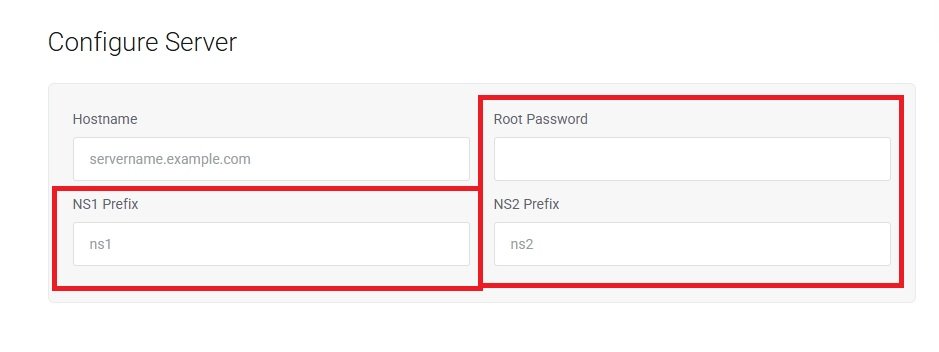
We do not offer customizable nameserver or root password options to our users, so we want to remove those fields from the VPS order page specifically (only for VPS, not for dedicated servers). I’ve tried several available methods, and while most successfully hide the fields, I still encounter issues such as the “This field is required” error or the fields being removed from the dedicated server order page as well. Is there a reliable way to remove these fields without affecting the dedicated server or any other products? Thanks!
-
Domain status automatically changed to 'transfer way'
Looper replied to Looper's topic in Troubleshooting Issues
Weird, because all those domains are in my registrar account https://marketplace.whmcs.com/product/6516-itcom-registrar-module I don’t see any on-screen error on the client’s domain tab, only the status shows as ‘transfer away.” and the domains are highlighted in red in the dropdown Yes, all the domains are active in my domain registrar account I think the module is causing this issue. I asked someone to review the ITcom WHMCS module, and he said: -
Domain status automatically changed to 'transfer way'
Looper replied to Looper's topic in Troubleshooting Issues
Here is the Domain Sync Report email I received. First, I manually changed those domain statuses to Active, but after the sync, they were automatically changed back to Transfer Away. I don’t see anything else mentioned in that email. -
Domain status automatically changed to 'transfer way'
Looper replied to Looper's topic in Troubleshooting Issues
I never receive any Domain Sync Report emails. How can I enable this or check it? -
We are facing a very strange issue. One of our domain statuses automatically changed from Active to Transfer Away. I checked the module logs but didn’t find anything specific, and everything seems to be working so far. However, I’m not sure why the status keeps changing. When I checked the Domain Registrations area, those domains were not listed. But when I turned off Hide Inactive Clients, they appeared. I also tried to manually change the status back to Active, but after the next cron run, it strangely changed to Transfer Away again. Any idea what might be causing this issue or how to fix it?
-
I upgraded to version v8.13.1 and am using Lagom v2.3.5. I also upgraded PHP from 8.1 to 8.3, and everything seems to be working perfectly. However, when I checked the PHP version compatibility area, I found these errors. Any idea why I'm getting them and how to fix them?
-
Good try, Mr. Hacker! So, you are the one who does these spams. Ignore them, it's not true
-
Today, when I tried to accept 6 orders together, I encountered a Cloudflare error stating "server overload." However, when I checked the server logs, I didn’t find anything. I have a good amount of resources on my server, and I didn’t find any downtime either. The issue also occurred when I clicked the "Pay" button on the checkout page. The page loaded for over a minute and then showed this error. It never happened with single orders. What could be the issue? WHMCS version: v10.1.0 PHP: v8.1 memory_limit: 512MB max_execution_time: 10 mins max_input_time: 2 mins post_max_size: 64MB

-
This! custom field fixed my issue, but don't use the default one provided in the documentation. Use something like '7 + 3 = ?' instead
-
is this still works with v8.10.1 with Lagom2?
-
I added Facebook Pixel code using a hook, and it's working just fine. However, I want to set up an event to capture sales, such as when someone makes a purchase. How can I track that in WHMCS? I used this hook to add the pixel:

-
Hello, We are considering using a CRM solution but are unsure how it would provide additional benefits, given that WHMCS already manages many functions such as user management, invoicing, ticketing, and billing. I have seen some posts where people mentioned using a CRM, and I’m curious to know for what specific purposes.
-
Sorry, but I didn't get you. 😕 Let me explain how I did it I edited the Templates > Theme > header.tpl file and added the tracking code under <head>. However, when I update WHMCS it always gets removed

